
How do recurring AI agent workflows separate tasks from runs?
An AI agent workflow carries a task through tool calls, evidence gathering and reviewable output. Recurring AI agent workflows also need explicit account context, a reporting window and permission to act. Lumian Agents separates the saved task from each run so those assumptions and outcomes remain inspectable.
Consider a familiar request: “Every Monday, review last week’s sales and tell me what needs attention.”
To answer that request, an analyst needs to know which account to review, whether “sales” means order value or revenue after cancellations and refunds, and the exact dates covered by “last week.” Acting on a recommendation still needs the operator’s permission.
Software has to have all of that written down. Which account, what "sales" means, the reporting window, the evidence available and whether the agent may act: each shapes what a run can produce. Drop one and you can get a report that reads well and answers the wrong question.
In Lumian Agents, tools gather evidence within the account-scoped run. The run retains the work and its outcome so an operator can inspect what happened, including the places where an agent should expose a limit instead of forcing a conclusion.
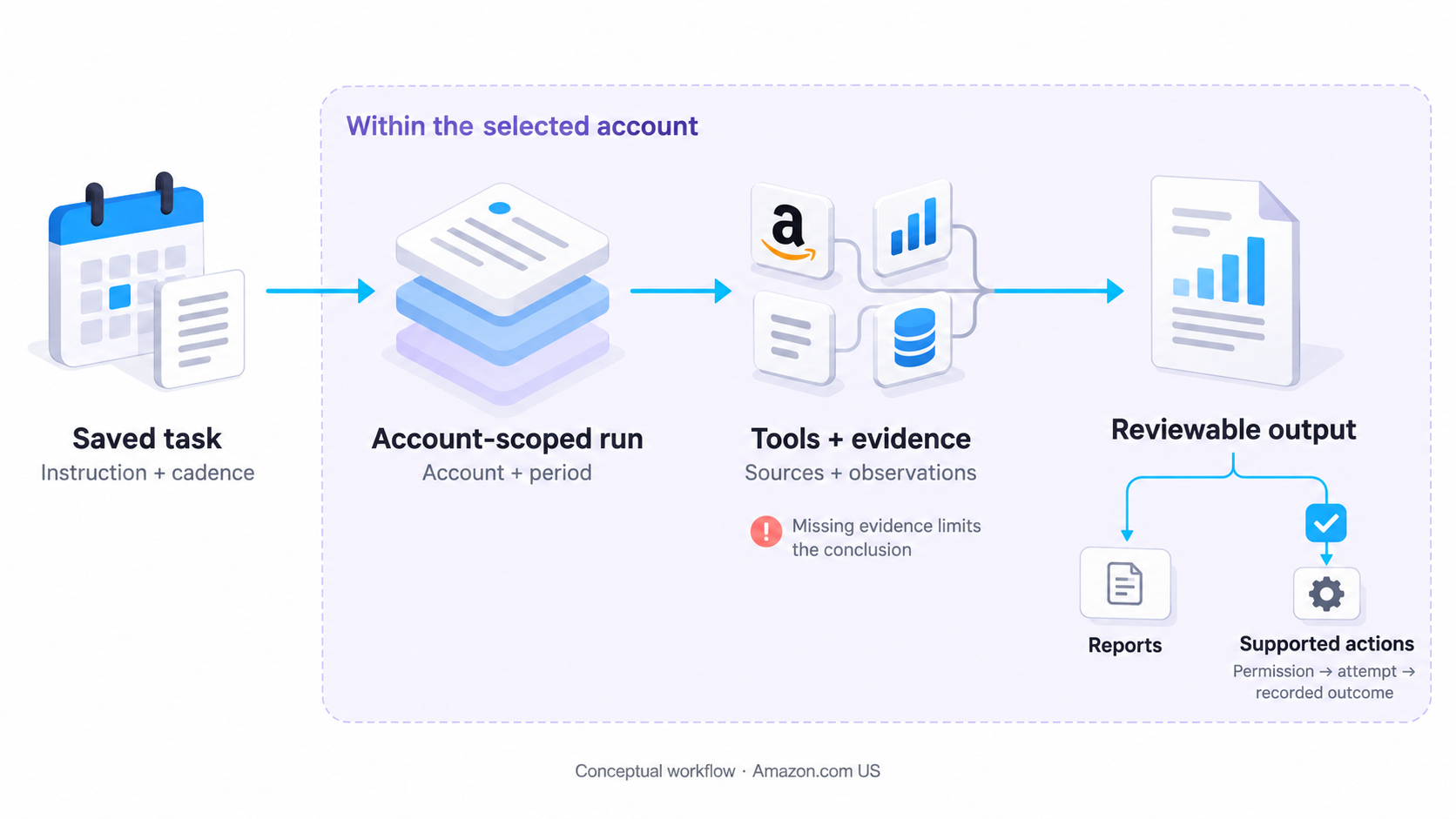
Recurring AI agent workflows separate saved intent from each attempt to carry it out. A saved task holds the instruction, cadence, time, timezone, and chosen approval behavior. A run holds the account context and the record of what happened on that occasion.
Keeping them separate makes an ordinary operational question answerable: did the Monday job run, and what did it actually use?
The reporting window deserves the same care as the start time. A Monday morning report can accidentally compare a few hours of the current week with seven complete days from the previous one. Both queries may succeed. The comparison would still be misleading. For a weekly workflow, define comparable periods and show their boundaries in the result. The guide to metric definitions and comparable reporting periods explains how to keep those comparisons useful in a weekly review.
For an Amazon US account, the assumptions might look like this. The YAML illustrates the task and is not a configuration file to submit:
job: weekly-account-analysis
marketplace: Amazon.com US
account: selected-authorized-account
schedule:
  cadence: weekly
  timezone: America/New_York
  day: Monday
  time: "09:00"
reporting_window: previous-complete-week  # a week that has finished
compare_with: preceding-complete-week
output: evidence-backed-report
review_owner: account-operator
external_actions: require-review  # nothing changes until it's reviewed
Written out like this, you can see the account, the period and where review kicks in before any analysis starts. It also gives the operator something exact to edit. “Run it earlier” is a schedule change. “Compare complete weeks” changes what the analysis means.
Could the Monday job start twice? Lumian Agents works out cadence slots to make that less likely, and each attempt gets a run record of its own, so you can look at every one. Don't read either as a promise of exactly-once execution. Once an external system is involved, neither gives you that on its own.
How does account context reach the tools?
Lumian Agents resolves authorized account context before the work proceeds. That scope travels into the run and its tools. A previous result in the conversation should not become an accidental account selector for the next task.
An operator can work across several accounts in the same day. “My inventory” is convenient language for a conversation, but it leaves a dangerous amount of room for interpretation in a tool call.
For the weekly report, the reader should be able to identify the account, marketplace, and period without reconstructing the conversation that started it. That context also makes the report easier to challenge. If the period is wrong, the operator can identify the error before spending time on the recommendations.
Everything lands in one record: progress, tool outcomes, where each source came from, the final output and the status of any action. The closing summary tells you what the agent concluded, and the rest of the record lets you check it.
How should runs retain tool evidence?
A run should retain tool outcomes, source provenance and detailed results so the evidence remains inspectable after reasoning ends. In agentic workflows, each new tool result can change what the agent investigates next; the evidence behind those decisions needs to survive too.
Take the weekly analysis. Suppose sales have declined and advertising spend has changed over the same period. Those are observations. Explaining one as the cause of the other needs additional evidence. The report should leave room for a reviewer to accept the observations while questioning the explanation.
That is why provenance matters at the finding level. A reader needs to know where a result came from and when it was observed. Lumian Agents records tool outcomes and source provenance with the run. Detailed tabular results can be retained separately from the smaller view used during reasoning.
Why keep two versions? A large result can be too big for the agent to reason over, so it may work from a compact view. The person reviewing the run, though, may want every row. If only the compact view survived, trimming the agent's context would throw the evidence away.
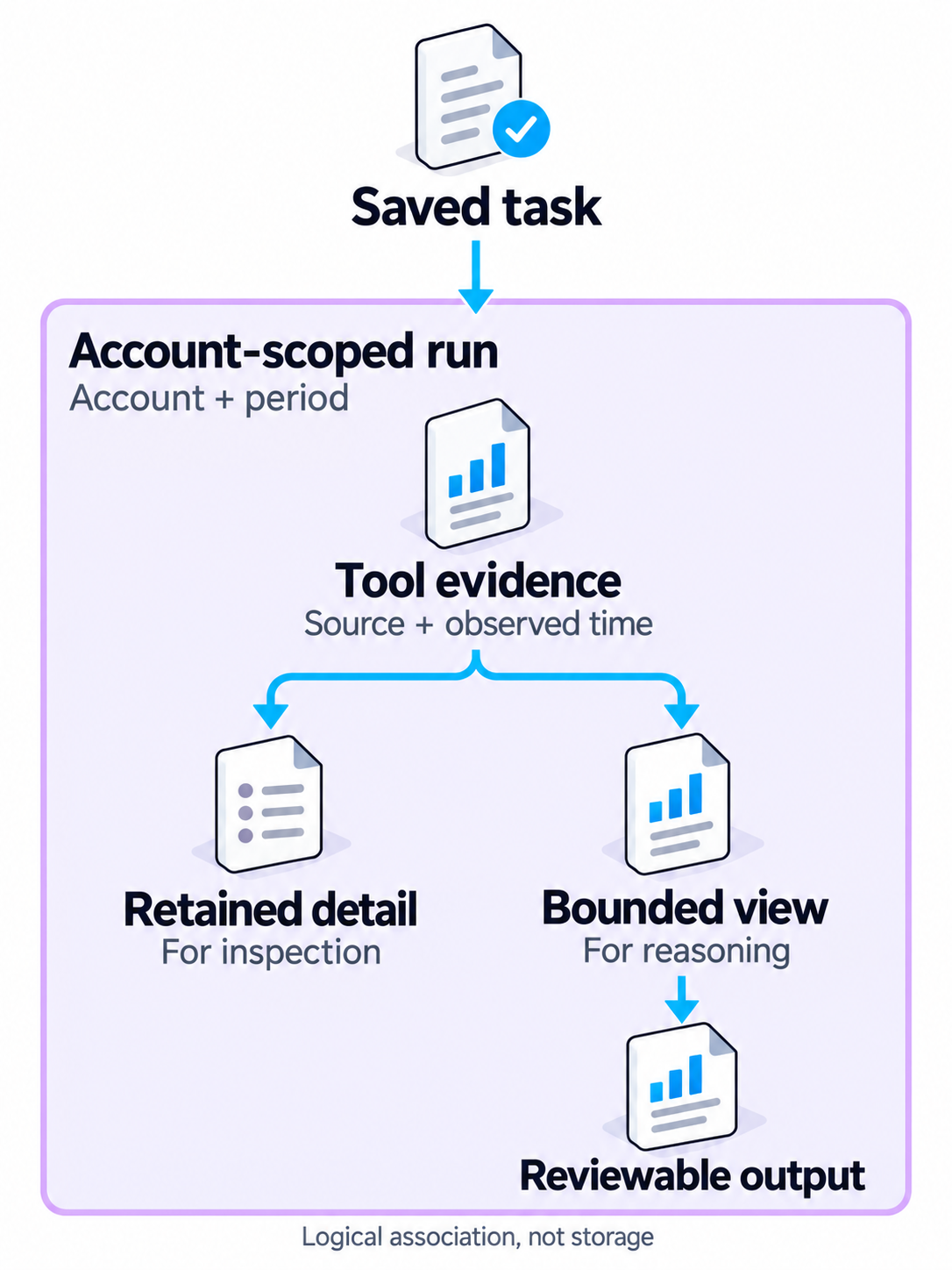
An operator usually reads a report like this in order. What changed? Why does the agent think it changed? What should happen next? At each step they should be able to trace the answer to its evidence.
What does an empty, pending or stale result mean?
A confirmed empty result means no matching records were found. Pending or unavailable input leaves the relevant question unresolved. A stale source needs its age and coverage stated so the reader can judge which conclusions it supports.
Fresh isn't the same as complete. A source updated an hour ago might still cover only half of last week. And when a tool call succeeds but comes back with no rows, that alone can't tell you whether the data is missing or there really was nothing to find.
Lumian Agents checks the readiness and freshness signals that matter for a job, and it can show you which inputs are pending, unavailable or unresolved. Some jobs wait while their data is pending and others don't, depending on the workflow and its inputs. Don't assume one freshness gate sits in front of everything.
Return to the weekly report with an advertising input still pending. That limits an explanation involving advertising. An independently supported inventory finding may still be useful. The missing input belongs beside the affected conclusion, where the reader can see what it prevents the agent from establishing.
What the run finds | What the reader needs to know |
Evidence covers the requested period | The finding, its source, and the comparison window. |
A required input is pending | Which part of the analysis remains unresolved. |
Coverage ends before the requested period does | The actual coverage and the comparisons it can support. |
Sources disagree | The disagreement and its effect on the recommendation. |
These are interpretation rules for a workflow, not a claim that every condition triggers identical automatic behavior. The operator should be able to distinguish “no issue found” from “unable to evaluate.”
Where does human approval enter the workflow?
Approval decides whether the agent may even try a supported action. When an agent proposes a supported write, it becomes an action record you can review. In an interactive session it waits until you approve it. On an autonomous schedule it can go ahead, but only if the task's saved approval setting allows it. So before anything runs, the action has to be supported and the right permission has to be in place. Having a schedule doesn't count as permission.
A weekly report can recommend a change without changing the account. Most catalog agents produce analysis, reports, recommendations, plans, or assets. Their output needs to say what was prepared and what remains for someone to decide.
Review Requester is a good example. It can send review requests for eligible orders. Run it interactively and it asks you to confirm the batch first. Run it on a schedule and it does whatever the saved approval setting says. That's one agent with one write capability, though. It doesn't mean every agent can publish, file or edit things for you.
For teams that want a Brand Manager and specialists to coordinate the work, Lumian’s managed-service model explains that separate offer. A self-service Lumian Agents subscription does not automatically include those services.
Staging is what makes an action reviewable. With permission, the agent can attempt it, and afterwards the record says whether it was confirmed, failed or is still unresolved.
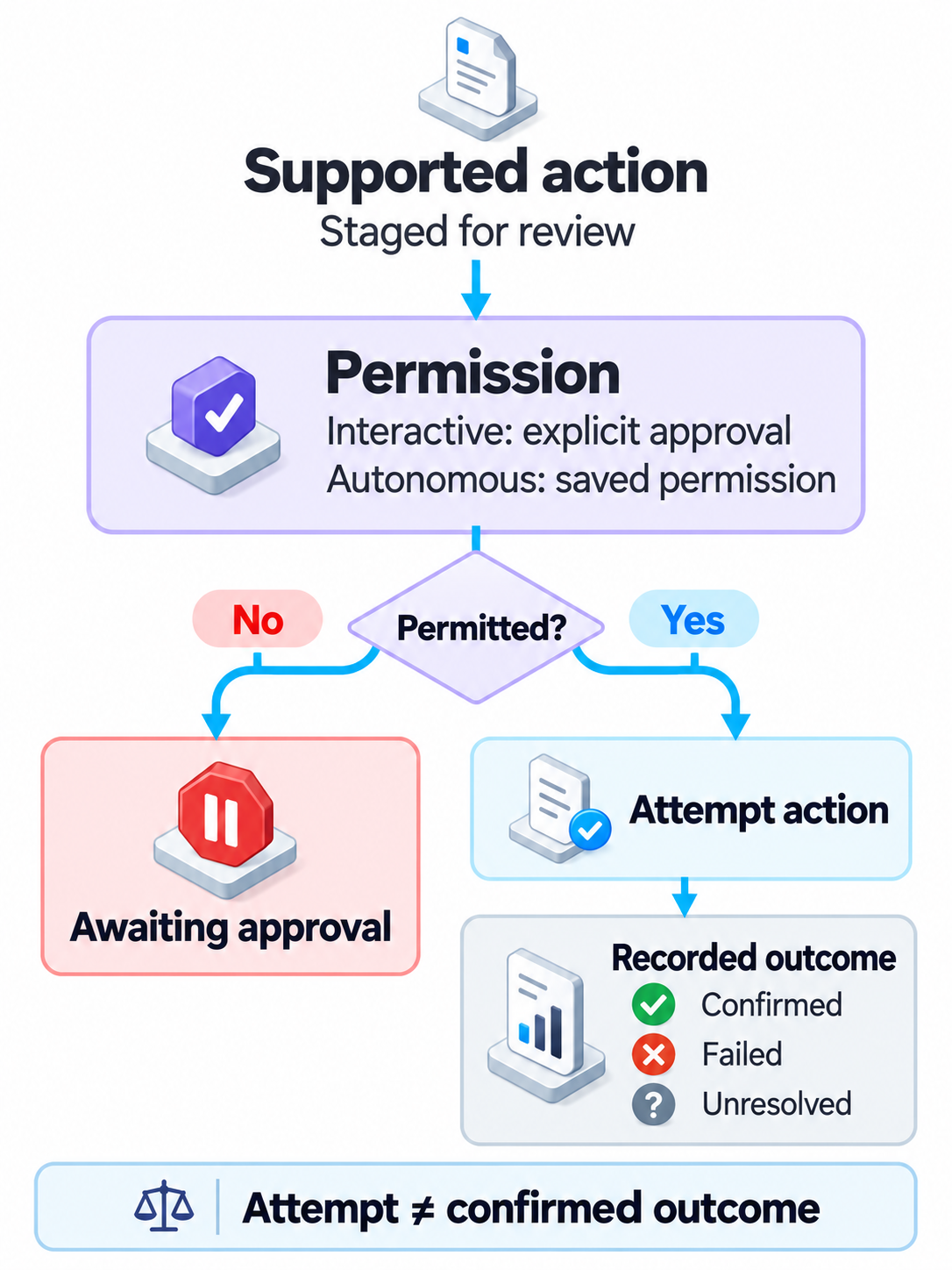
The control flow, roughly (a sketch, not production code):
account = authorized_account(task)  # fails without access
inputs = check_inputs(account)
run = new_run(task, account, task.approval_policy)

for step in plan(task, inputs):
    obs = call_tool(step, account)
    run.record(obs, source, observed_at)  # keep where and when

    if obs.proposes_external_change:
        action = stage(obs)
        if run.autonomous and saved_policy_allows(action):
            attempt_and_record(action)
        else:
            action.await_approval()  # a person decides

run.save()  # result and every action's status
Implementation detail is stripped out so you can see who does what. Gathering evidence, preparing an action, approving it and recording what happened are separate jobs, and when one breaks you'll want to know which.
When is an agent workflow complete?
That depends on what the run was for. Our weekly report is finished once it has answered the question, shows where each finding came from and says what it couldn't check. If the run only prepared an action, it's done once someone can review it. External actions are trickier. Submitting one doesn't finish anything, because you still need to find out whether it worked.
The difficult case is an uncertain response from an external system. A request may have been accepted even if its response never reaches the caller. Repeating it can create a second action. When designing such a workflow, the outcome needs reconciliation before a retry is safe to choose. This is a design consideration, not a claim that every Lumian Agents workflow performs automatic reconciliation.
Be just as careful when nothing has changed. If the report is still waiting on a dependency, say so. If an action is waiting for approval, it should look pending, and a failed attempt should still show that it failed. Wrap all of that in a friendly “done” message and the operator can't see what's still outstanding.
The weekly task becomes useful when someone can open its run and understand the account and period it used, inspect the evidence behind a finding, and see whether a proposed action remained a proposal or actually completed. That gives the next Monday’s run a clear standard to meet.
Start free with Lumian Agents to explore the available workflows for Amazon.com US.