
TL;DR
Amazon Seller Assistant, the free AI assistant inside Seller Central, is good enough for monitoring and routine fixes, and its workflows can act without asking if you set them to. Amazon Ads Agent is the new name for Amazon's ad platform, and most of its AI costs nothing beyond ad spend, though its chat was still in closed beta on November 12, 2026. You keep the margin floor and the job of checking its work, which Amazon's Selling Partner plugin and listing terms put on you in writing.
- Seller Assistant workflows can act without asking you. On November 2, 2026, Amazon staff wrote that you choose whether each workflow recommends actions or executes them directly.
- Amazon's Profit Analytics can hold your cost of goods, but no Amazon page we read says Seller Assistant or Ads Agent check it before they act. Put a price floor in every pricing workflow.
- Amazon's Selling Partner plugin, which connects Seller Assistant to Claude and Amazon Quick, makes you responsible for every action the connected AI takes, "whether or not you directly initiated them."
- Amazon Ads Agent is the ad platform Amazon advertisers now use. The Ads Agent chat inside it was a closed beta in 25 countries on November 12, 2026.
- Amazon's headline ad AI results come from beta tests, and Full-Funnel's long-term sales figure is a 12-month estimate, so judge both against your own TACoS.
What are Amazon's AI tools for sellers, and what does each one do?
Amazon's AI tools for sellers live in two places: Amazon Seller Assistant, the free assistant inside Seller Central, and Amazon Ads Agent, which is what Amazon now calls its ad platform. Both can now change things in your account instead of only advising. When Amazon launched Seller Assistant workflows on September 23, it promised sellers would approve every action before it ran. Six days later, its Accelerate recap said sellers could let a workflow act on its own, and by November 2, Amazon staff were telling sellers on the forums that a workflow can carry out changes directly if you set it up that way. Ads Agent is heading the same way. Keyword auto-optimization, due for US advertisers in January 2027, makes its changes first and leaves you to reverse the ones you don't like.
None of this means you should stay away. Seller Assistant is free and can't be switched off, and most of the AI in Ads Agent costs nothing beyond your ad spend. What you do get to decide is which jobs they finish without you, and what you have to tell them first.
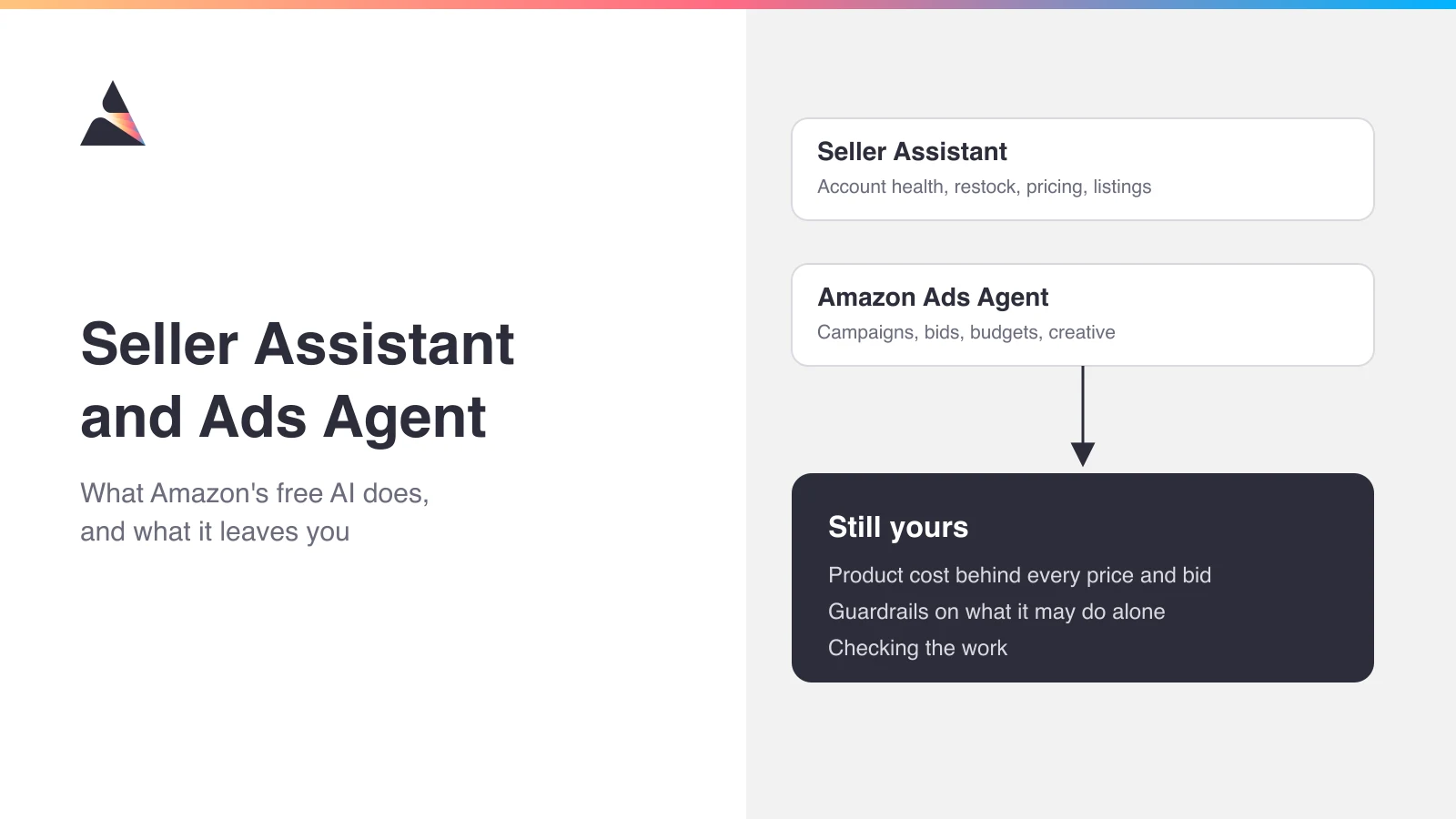
Amazon's two AI tools split the selling and ad jobs. Product cost, guardrails, and checking the work stay with you.
Pricing is the obvious first job to hand over, and it's one of the examples Amazon used in its launch post: a workflow that watches your top category and adjusts your pricing when it spots an opening. Here's how that could play out, using a made-up brand and numbers. You sell an insulated water bottle at $30. It costs you $9 to land one in an FBA warehouse, and Amazon's fees plus your ads take about $12 more, so you keep roughly $9. You tell a workflow to match any rival who undercuts you. A rival drops to $26, the workflow matches, and after a slightly smaller referral fee you keep about $5.60. Then the rival runs a $19 weekend sale. The workflow follows, and you're paying about 35 cents to sell each bottle.
The workflow did what it was told. Nobody told it what the bottle cost, and nothing on the Amazon pages we read says Seller Assistant looks that up before it acts.
We built the table below from 33 Amazon announcements, help pages, and staff forum posts we read between November 1 and 12, 2026, plus the seller threads quoted later. Four Seller Central help pages, including the ones for workflows and Profit Analytics, only open when you're logged in. So when we say Amazon hasn't said something, we mean on the pages we could read.
Job (Amazon tool) | What it does | Status (Nov 12, 2026) | Who has the last word |
Account health (Seller Assistant) | Watches your account, flags problems, and fixes them if you approve | Free, and reaches over 90% of sellers worldwide | You. It fixes only what you approve |
Restock and pricing (Seller Assistant workflows) | Restocks and reprices "around the clock" | No separate price or country list published | You choose. Start on recommend, with a price floor |
Listing copy (Add Products, A+, Enhance My Listing) | Drafts titles, bullets, and attributes for you to submit | Inside Seller Central, no fee listed | You. You review and submit every draft |
Campaign setup (Seller Assistant) | Checks listing and stock, then drafts Sponsored Products and Sponsored Brands campaigns for your approval | Shown at Accelerate 2026, no rollout date yet | You. It drafts and you approve |
Keywords and bids (sponsored ads auto-optimization) | Adds keywords that sell and pauses weak ones under your maximum bid | Coming to US advertisers in January 2027 | Amazon, until you reverse it. Check it weekly against TACoS |
Whole-funnel budget (Full-Funnel Campaigns) | Splits one daily budget across sponsored ads, display, video, and streaming TV after you approve the creative | US advertisers who sell on Amazon, above a minimum daily budget | Amazon, within your budget. Keep a baseline |
Ad questions and changes (Ads Agent chat) | Answers questions and applies bid, budget, and keyword recommendations once you approve | Closed beta in 25 countries | You. You approve each change |
Ad creative (Amazon Creative Studio) | Makes images, video, and ad concepts | No extra cost (Creative Agent is US only) | Amazon's moderators first, then you |
Read down the last column. Apart from workflows you've set to execute, the Seller Central tools wait for your yes. On the ad side, auto-optimization and Full-Funnel act first, inside the bid or budget you set, and you check them afterward.
What is Amazon Seller Assistant?
Amazon Seller Assistant is the agentic AI assistant in the top navigation of Seller Central. It answers questions from your own account data, flags problems, drafts fixes and support cases, and runs workflows. Amazon first launched it in 2023 and bills it as "the free conversational AI tool inside Amazon's Seller Central dashboard" (Amazon Accelerate 2026 recap). It has reached "over 90% of Amazon's selling partners worldwide" in their own language. If you'd rather work with a chart than read a reply, you can open a canvas and model scenarios or compare pricing on live data. The canvas launched in the US and UK at no extra cost.
When a seller asked on the forums how to turn it off, an Amazon staff member replied that "it isn't possible to turn Seller Assistant off." Sellers also say it now stands between them and a support case. "My new favorite is when seller assistant recommends using seller assistant," one wrote on Reddit. Back in the Seller Central thread about turning it off, another seller shared what gets a case through: one issue at a time, a very short explanation, the exact ASIN, order, or case, and one specific request.
What are Seller Assistant workflows?
A workflow is a job you describe in a sentence, with limits you set, that Seller Assistant keeps doing after you log off. Amazon launched them on September 23, 2026, as "custom automations that run continuously" (launch post), and the same post promises "every action is logged with a complete audit trail."
You don't have to start from a blank box. Amazon ships templates for account health, order summaries, pricing trends, and product expansion, and account health is a sensible first one to try.
Can Amazon Seller Assistant act without asking you?
Yes, if you set a workflow to. Each Seller Assistant workflow can either recommend actions or carry them out, and the way Amazon describes that choice has moved since launch:
Amazon says | Where and when |
"sellers stay in control, reviewing and approving them before they're carried out" | Launch article, Sept 23, 2026 |
"Sellers choose whether it surfaces insights, drafts actions, or acts on its own." | Accelerate recap, Sept 29, 2026 |
"can even take actions on your behalf — with your approval every step of the way" | Amazon staff, Seller Central forums, Oct 26, 2026 |
"You choose whether it recommends actions for your review or executes them directly." | Amazon staff, Seller Central forums, Nov 2, 2026 |
Sensitive actions, such as issuing refunds or sending buyer messages, "require approval from you or your designated secondary users before they execute" | Workflows help page, as it appears in search results (the page needs a login), checked Nov 12, 2026 |
So refunds and buyer messages still wait for a yes. Nothing we read says the same about prices or listing edits, so if you pick execute for those, plan on finding out after the change has gone live.
What do Amazon's AI listing tools do?
Amazon's AI listing tools draft listing copy for you inside Seller Central. In Add Products and the A+ Content Manager, you describe the product briefly, upload an image, or paste your website's address, and the tool drafts titles, bullet points, and descriptions that you review and edit before you submit (Amazon). The bulk version only works for products you're adding to your catalog. For live listings, Enhance My Listing suggests new titles, attributes, and descriptions, and you accept or decline each one.
What is Amazon Ads Agent?
Amazon Ads Agent is the ad platform you already log into. On September 29, 2026, Amazon announced it as "the new name of the unified platform, now powered by agentic AI", and moved your sponsored ads, DSP campaigns, and settings across. You can still build every campaign by hand.
The name causes mix-ups, because Amazon also uses it for an assistant. Its product page for the chat is titled "Ads Agent: An AI marketing assistant from Amazon Ads," and an older Amazon Marketing Cloud tool is still called Ads Agent in AMC. When someone says Ads Agent, check whether they mean the platform advertisers now use or the chat that only beta advertisers have.
Amazon's formal name for the chat is the conversational experience in Amazon Ads Agent. It's "available in closed beta to eligible self-service and managed-service advertisers," with access through your Amazon Ads account team (Amazon Ads), and Amazon hasn't published a price. It proposes changes that you approve before they're made. Its help page lists media planning, bulk budget and bid edits, plain-language analytics, and billing and policy help. Most of the planning and bulk tools are for display, video, and audio campaigns. For Sponsored Products, it recommends targeting, bids, and budgets you apply in one click.
What are Amazon's AI advertising tools?
Outside the chat, Amazon's AI advertising tools are Full-Funnel Campaigns, a sponsored ads intelligence dashboard, keyword auto-optimization, and Creative Studio. They differ most in when you get a say.
Full-Funnel Campaigns hand over the most. A Full-Funnel Campaign is a single Amazon Ads campaign in which Amazon's AI splits one daily budget across sponsored ads, display, video, and streaming TV to grow long-term sales. You supply the products, the budget, a ROAS threshold, and creative you've approved before launch. They're open to US advertisers who sell on Amazon, a minimum daily budget applies, and there are "no upfront fees or additional charges for orchestration or AI-powered creative generation" (Amazon Ads).
The sponsored ads dashboard waits for you. Amazon promised it would explain each suggested action and let you "apply, edit, or skip each action," so nothing changes until you choose (Amazon Ads). Keyword auto-optimization doesn't wait. It's a setting you switch on in your campaign, after which Amazon's AI adds keywords that sell, pauses weak ones, and widens product targeting, all under the maximum bid you set. You can "edit or reverse actions at any time," which is why the table says to check it weekly against TACoS.
Seller Assistant is moving into ads as well. At Amazon Accelerate 2026, Amazon said it checks whether a product's listing and stock are ready to advertise, flags what to fix, and drafts Sponsored Products and Sponsored Brands campaigns you can approve (recap). Amazon hasn't said when that reaches every account. Our guide to AI PPC management on Amazon shows where these tools fit in a weekly PPC routine.
What does Amazon Creative Studio do?
Amazon Creative Studio is Amazon Ads' AI workspace for ad images and video. Its chat-based Creative Agent drafts ad concepts, storyboards, video, images, and audio for US advertisers, and the separate image and video generators also work in eight more countries, including Canada, Germany, India, and the UK (Amazon Ads help).
Amazon says Video Generator makes "up to six 15-second professional video ads within minutes" at no additional cost (Amazon Ads). Here the last word starts with Amazon's moderators. Every AI-made asset goes through Amazon Ads moderation before it can run, and there's a cap on how many you can make in a rolling 30 days (Amazon Ads help).
Can you use Amazon Seller Assistant in Claude?
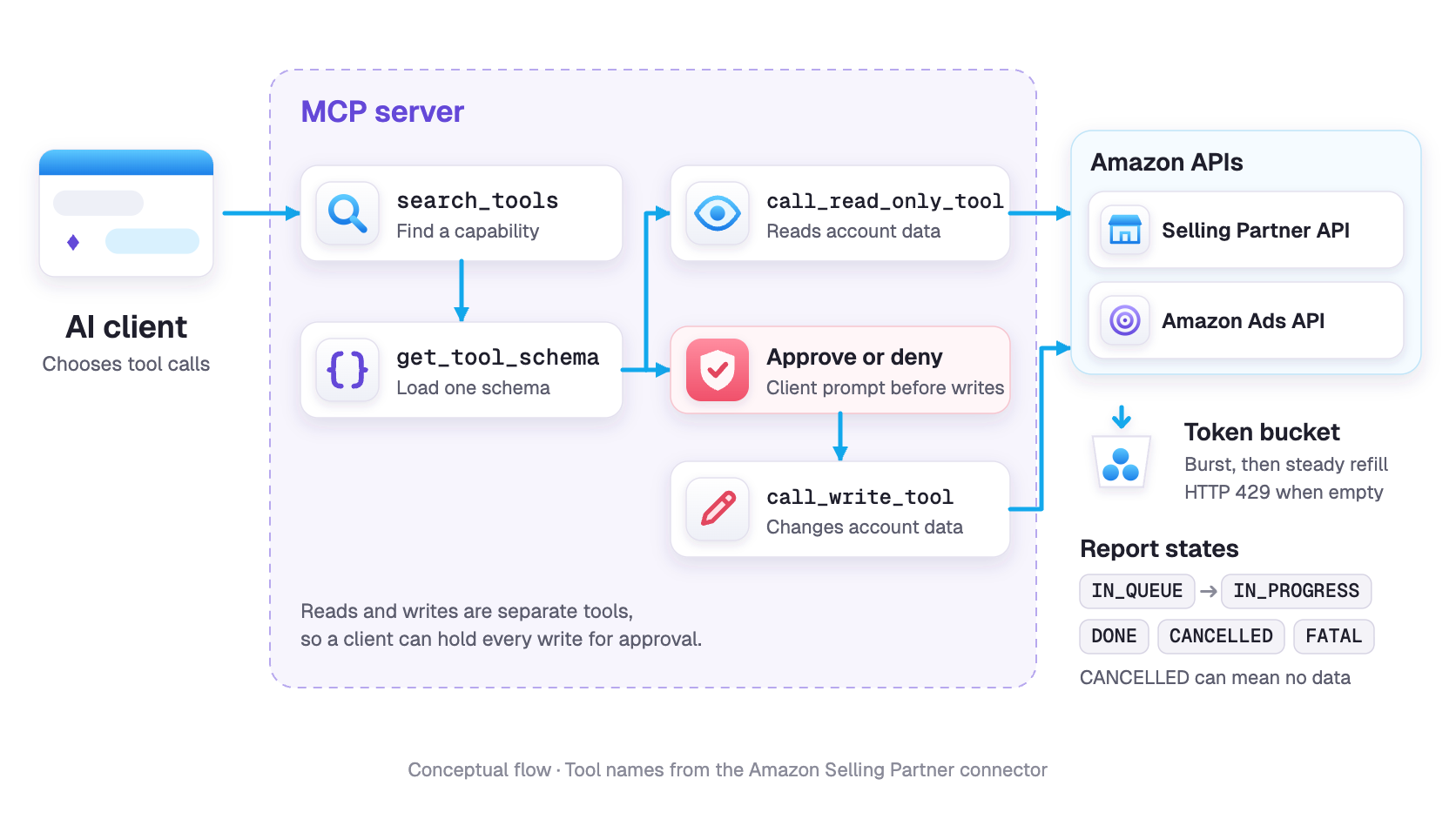
If you sell in the US, yes. As of November 12, 2026, Amazon's Selling Partner plugin, still in beta, takes Seller Assistant into Claude and Amazon Quick, and we found no ChatGPT version. It brings its "persistent memory of each seller's pricing patterns, inventory cycles, and growth goals" along, so a pricing habit it learned in Seller Central follows you into the other tool. The AI you connect doesn't only read your account. It "can act on it, the same way Seller Assistant does inside Seller Central." You'll need a Professional selling plan, and new sign-ups join a waitlist (Seller Central help). The plugin's help page lists sales, inventory, traffic, listings, pricing, fees, and inbound shipments, and doesn't list your advertising data.
Ads go through a separate connector. The Amazon Ads MCP Server lets your own AI agents "create, update, and optimize campaigns" in Ads Agent (Amazon Ads). We cover both connectors in our guide to Amazon's MCP servers.
Is Amazon Seller Assistant enough, or do you need another tool?
Seller Assistant is enough when your part of the job is small: the task fits in a sentence, a wrong result would be obvious, and someone reads what it flags. It runs short when the decision turns on something only you know, like what each bottle cost you, how much cash you've got this month, or the Black Friday deal you've already committed to.
A seller on Amazon's forums pasted five new bullet points into the chat, and the assistant "then went ahead and updated all 9 listings in a few seconds." In the same thread, someone had it chase a storage-fee reimbursement. It "compiled the data for the year and month I needed, revised it as requested and submitted a case for me," they wrote, though whether the money came through was "another story." The one we'd copy first is on Sellers Ask Sellers, where a seller built a read-only workflow that finds listings pulled for a suspected pricing error and exports them to a CSV next to Amazon's reference prices (thread). It's read-only, so the worst it can do is hand you a wrong spreadsheet.
Those are three forum posts, so take them as examples rather than a verdict.
Bigger jobs are patchier. When one seller tried to build a workflow that tracks refunded orders that never came back, the assistant said it could only look orders up one at a time. "What is the point in building a workflow when I still need to do all the work?" the seller replied.
The other limit is on your side. Picture a workflow noticing that your sage-green bottle has stopped selling. If that alert sits unopened because everyone's busy, the bottles keep aging in the warehouse, and you can still end up paying the storage fee it was trying to warn you about.
Seller Assistant is usually enough on its own when:
- you want early warnings and first drafts, and someone acts on them within a few days
- each job fits in a sentence and a wrong answer is easy to spot, like a bulk bullet update or a fee-reimbursement case
- the workflow is read-only or set to recommend
- one person reads the week's action log
It isn't enough on its own when:
- the decision depends on your product cost or a promotion you've committed to, neither of which any Amazon page we read says its AI checks
- a workflow would change prices or listing facts on execute without a floor or an approval step
- the job means checking many records at once, like the refunds workflow above
- nobody owns the alerts, so warnings sit unread until the fee arrives
Before you switch any workflow from recommend to execute, ask three questions. Can you write its limit as a number? Would a wrong action show up within a week somewhere a person looks? Can you undo it? If any answer is no, leave it on recommend.
One seller put the objection to all this bluntly: "if you're telling us we need to sanity-check all the automation chronically, it isn't automation."
That complaint fits some jobs better than others. A read-only report, or a draft waiting for your yes, takes a minute on a Monday. A workflow that changes prices or listing facts on its own means auditing changes that have already gone live, every week, and you take on that chore the day you pick execute.
What does Amazon's AI leave to you?
Anything that depends on your costs or your judgment stays with you, from the price floor and the limits on what the AI does alone to deciding whether its results are real. So does checking its work, and Amazon puts that in writing. The plugin's help page reads "You are responsible for all actions taken by the agent, whether or not you directly initiated them." Listing copy works the same way. The tools will draft it from a few words, an image, or a URL, but if you use it, "you agree that you've reviewed it, and that it's accurate, complete, and compliant" with the law and Amazon's policies.
Does Amazon's AI see your margin or inventory?
Amazon's AI sees some of your inventory and, on the pages we read, none of your margin. Amazon says Seller Assistant checks stock before it drafts ads. The Ads Agent chat's help page says it works from "your Amazon advertising data" and the context of your business, campaigns, and categories. That page, the Ads Agent product page, and Amazon's auto-optimization announcement don't mention your stock, your product cost, or whether you hold the Featured Offer (what sellers still call the Buy Box).
Ask the plugin about fees and it'll work out "referral and FBA fees at the price you specify," which is Amazon's half of the sum. Your half, the $9 it cost to land a bottle, has a home too. Amazon's Profit Analytics report, a Seller Central report rather than an AI tool, has had a field for cost of goods since September 2025, according to PPC Land. Amazon just hasn't said that a workflow or Ads Agent looks at that number before acting.
Work the floor out before you write the workflow. Add your landed cost, your other fees and ads per unit, and the least you'll accept on each sale, then divide by what's left after the referral fee. For the bottle, with a 15% referral fee, that's $9 to land it, $7.50 of other fees and ads, and the $3.90 a bottle you won't go below: ($9 + $7.50 + $3.90) ÷ 0.85, or $24. Tell the workflow "never price any color below $24" and it can still match the rival at $26, but it can't follow the $19 sale. Treat the result as a starting point, because your ad cost per bottle moves when your price and conversion rate do.
What guardrails should Seller Assistant workflows have?
Seller Assistant workflows need guardrails written in plain words. Amazon lets you "set guardrails," but no page we could read lists what one can enforce (the workflows help page needs a login). For the bottle brand, that's three lines. The $24 price floor comes first. Next, a bid cap for each ASIN at what a click has actually been worth to you lately, which your search term report will show. Last, a hold on any change to titles, the brand name, or the bottle's dimensions until you've seen it.
The dimensions line comes from a seller's warning. When Amazon floated a workflow that rewrites the listings driving your returns, the seller who complained about chronic sanity-checking saw the hole in it. Customers sometimes lie "about the return reason in order to get free shipping," the seller wrote, so the AI could "'solve' that problem by creating inaccurate dimensions, leading to legitimate complaints down the road." With listing facts behind your approval, that bad edit shows up as a draft you can reject. Our guide to approval gates and rollback safeguards sorts changes into the ones that can go through and the ones that should wait for a person.
Should you rely on Amazon's ads automation?
Yes, use Amazon's ads automation, but judge it by your own TACoS rather than Amazon's report. Full-Funnel Campaigns need "an initial learning period of approximately two weeks," so week-one numbers won't tell you much. Their long-term sales figure also counts sales you haven't made yet. Amazon describes it as "a 12-month estimate of future sales from new-to-brand shopping events."
The headline stats need the same squint. "40% faster first sales" comes from auto-optimized Sponsored Products campaigns in beta, measured on Amazon's US data from July to September 2026, and the footnote says "results are not predictive of future results" (Amazon Ads).
Take one post on r/AmazonFBA. The poster ran a Full-Funnel campaign, doubled the budget, and wrote that "daily sales went from 8 to 10 units to 60+, with ROAS above 6 at the peak. We had 3,000+ units in stock. They're now out of stock." The post doesn't say whether the writer is a seller or an agency, and a commenter from the seller-software company SellerLogic pointed out that changing the campaign mix and the budget at once makes it hard to know what caused the lift. Whatever caused it, the ROAS said success while the stock ran out. Our guide to ads that outrun your inventory covers how to catch that earlier.
Before you switch anything on, write down four weeks of total sales, ad spend, and TACoS (ad spend divided by total sales, which our TACoS guide explains). If you're starting in November, holiday traffic will flatter the new numbers, so check the same weeks last year as well. If you're weighing Amazon's automation against paid bid tools, our comparison of Amazon PPC automation tools covers the third-party side.
What mistakes do sellers report from Seller Assistant?
Mostly plain errors of fact. One seller was told they had no inventory when they did. In a Sellers Ask Sellers thread, one seller's case got written up about the wrong problem, and another wrote that on ads, "it said $0 spend when that wasn't accurate." Back in late 2025, before workflows existed, a seller on Amazon's forums complained it gave "no actionable recommendations other than to 'optimize' and 'increase ad budget'."
Amazon's acceptance figure doesn't settle it either way. It says sellers take Seller Assistant's recommendations "over 90% of the time." That measures agreement, not profit, and it's a different number from the 90% reach figure above. Accept a price cut that sinks your bottle below cost, and it still counts as accepted.
Amazon tells you to check, too. A staff member wrote on the forums that "it can make mistakes, so we show its reasoning and links the sources it references," and the Ads Agent help page warns, "Experiences powered by AI can make mistakes. Always review important information before taking action." None of that adds up to an error rate, but it's reason enough to read the output before it goes live. One seller, writing about handing over listing updates and promotions, said "I would redo it myself to check, anyway."
How to set up Amazon Seller Assistant and Ads Agent in your first month
Turning everything on is quick. The rest of the month takes longer, because you're watching what the tools do before you give them more room. For the bottle brand, we'd go in this order.
- Check your user permissions first. One seller clicked "create a workflow" and got a "Not Authorized" message until they changed User Permissions. While you're in there, decide who on your team can create, edit, and approve workflows, because some actions also depend on each person's permission level for that area, according to Amazon staff.
- Start every workflow on recommend. Run the account health and pricing-trend templates for two weeks and read what they flag. Our list of what to automate first, and what to keep by hand applies here too.
- Set a floor on every pricing workflow, $24 for the bottle brand.
- Keep titles, brand names, dimensions, and claims behind your approval.
- Write down your four-week baseline (total sales, ad spend, and TACoS) before Full-Funnel or auto-optimization goes live.
- Read the plugin's terms before you connect it. Connecting sends your data to "systems outside of Amazon's control," revoking access later "will not reverse prior actions or data access," and Amazon recommends opting out of letting your AI assistant train on your conversations. Our guide to connecting an AI agent to Seller Central safely goes further.
- Put one person on the log. Every workflow action gets logged, but the log only helps if someone opens it. Pick who reads it and when, say first thing Monday, and have them go through the week's actions before anything else.
What we're still checking
This piece reports what Amazon has published and what sellers have posted in public. It isn't a hands-on test, and those logged-in help pages stayed closed to us, so these questions are still open:
- When a workflow is set to execute, which actions besides refunds and buyer messages still ask first, and can a guardrail hold a price floor for each product?
- Do workflows or Ads Agent read the product cost you enter in Profit Analytics?
- Which countries have workflows?
- When does Seller Assistant's campaign drafting reach every account, and what will the Ads Agent chat cost after its closed beta?
Amazon's Seller Assistant team is answering questions live on the Seller Central forums on November 18, 2026, and these are the ones we'd put to them.
Where Lumian fits
We sell software and a managed service to Amazon sellers, so weigh this accordingly. Our advice is still to start with Amazon's tools. They're free or cost nothing beyond your ad spend, and nothing below replaces them.
If someone at your company already owns the checking and wants it run on a schedule, Lumian Agents runs scheduled checks on Amazon.com (US). Daily Restock Alert flags SKUs under 30 days of supply every morning, which is the warning that matters when ads outrun stock, as in the Full-Funnel post above. Daily ACoS Watchdog flags Sponsored Products and Sponsored Brands campaigns that drift over your ACoS target. That's an ad-level alarm, not a replacement for your TACoS baseline. Our scheduled jobs have their own approval setting, called Skip approval, which can let supported actions run without asking, so check it the way you'd check a workflow set to execute. There's a Free plan, so run one job next to Seller Assistant for a month and keep whichever answers your question better. Start Free.
If the sage-green alert sounded like something that would sit unopened at your company, another tool won't fix that. You need someone whose job is to open it. Our managed service puts people on it. A Brand Manager and specialists follow up on ads, stock, listings, and margin, with AI agents doing the repetitive checks. You still make the commercial calls and sign off on changes. Book a Strategy Call.
Frequently Asked Questions
Is Amazon Seller Assistant free?
Yes. Amazon Seller Assistant comes with your Seller Central account, and Amazon calls it "the free conversational AI tool inside Amazon's Seller Central dashboard." You still pay your selling plan and fees. As of November 12, 2026, no Amazon page we read puts a separate price on workflows or the Selling Partner plugin. The parts that can cost money sit outside Seller Central: Amazon Quick, Amazon's AI workspace, and whichever AI assistant you connect the plugin to, such as Claude. You don't have to use either, and no Amazon page we read says which Claude plans the plugin needs. Quick Plus is free for 12 months for primary account holders who sign up by December 31, 2026, and for 30 days for other sellers, and it lists at $20 per user a month on annual billing.
Is Amazon Ads Agent free?
Mostly, yes. You pay for the ads you run, and the pages we read list no separate fee for the Amazon Ads Agent platform. Sponsored ads are cost-per-click with no minimum spend. Full-Funnel Campaigns charge per click or per thousand impressions, with no extra charge for the AI that splits your budget or makes the creative. Amazon says the sponsored ads dashboard and auto-optimization come "at no extra cost." As of November 12, 2026, no Amazon page we read gave a price for the closed-beta Ads Agent chat.
Does Amazon Ads Agent improve ACoS?
No Amazon page we read gives an ACoS figure for Amazon Ads Agent. The beta results Amazon has published measure speed, sales, and long-term ROAS instead. Campaigns using keyword auto-optimization saw "a first sale 40% faster and a 13% increase in sales" in Amazon's beta testing, and Full-Funnel advertisers saw "67% higher long-term ROAS than independently configured campaigns on average" in early beta results from June to August 2026. To see whether it helps you, compare your own ACoS (ad spend divided by ad sales) and TACoS before and after.
What's the difference between Seller Assistant and Amazon Ads Agent?
Seller Assistant works on your selling account in Seller Central: inventory, pricing, account health, listings, and support cases. Amazon Ads Agent is where your ads run. It's the new name for Amazon's ad platform, holding sponsored ads, Full-Funnel Campaigns, and display, video, and audio campaigns, and the Ads Agent chat is a separate closed beta inside it. The clearest overlap is campaign setup, because Amazon says Seller Assistant can check whether a product is ready to advertise and draft Sponsored Products and Sponsored Brands campaigns for you to approve.
Can Amazon Seller Assistant change my prices automatically?
Yes, through a workflow you've set to execute. Amazon's launch example adjusts your pricing when it spots a competitive opening. Amazon has a second automatic repricer as well. Automate Pricing, a separate rules-based tool included free in the Professional selling plan, also changes prices on its own and lets you set a minimum price. No Amazon page we could read says what a Seller Assistant workflow guardrail can enforce, so write your price floor into the workflow yourself.
Can I use Amazon Ads Agent if I only run Sponsored Products?
Yes. Amazon Ads Agent is the platform your sponsored ads now run in, and your existing campaigns, reporting, and settings carried over, so you can keep building Sponsored Products campaigns by hand. Sponsored ads are cost-per-click with no minimum spend. Keyword auto-optimization reaches US advertisers in January 2027, and Amazon said its sponsored ads intelligence dashboard would reach all US sponsored ads advertisers in October 2026. Full-Funnel Campaigns, which need a minimum daily budget, and the closed-beta Ads Agent chat are optional.
Does Amazon Seller Assistant work outside the US?
For most sellers, yes. Amazon says Seller Assistant has reached over 90% of its selling partners worldwide in their own language. The newer pieces are narrower. As of November 12, 2026, the Selling Partner plugin is US only, the canvas workspace launched in the US and UK, and no Amazon page we read lists the countries where workflows run.
How do I get access to the Amazon Ads Agent chat?
Through your Amazon Ads account team. As of November 12, 2026, it's a rolling closed beta for eligible advertisers in 25 countries, the US, Canada, Mexico, the UK, Germany, India, and Japan among them, and no Amazon page we read says when it opens to everyone. Asking doesn't guarantee a seat, because access depends on eligibility, marketplace, language, campaign type, and capacity. If the answer's no and you advertise in the US, you can still run Full-Funnel Campaigns without the chat.
Is the Selling Partner plugin safe to connect to Claude?
It depends on two trade-offs you accept: your data leaves Amazon, and you answer for what the agent does. Inside Seller Central, Amazon says Seller Assistant keeps your data within Amazon. Once you connect the Selling Partner plugin, your data goes to systems outside Amazon's control under your AI assistant's terms, and you're responsible for every action the agent takes. Actions need your approval by default, you can limit the plugin to answers only, and only account owners and administrators can authorize it unless you give secondary users permission. Revoking access later won't undo earlier actions.