How to Automate a Weekly Amazon Purchase Order
Replace Monday spreadsheet exports with automated supplier POs: stream live Seller Central data via SP-API, calculate dynamic reorder points, and approve drafts in one click.

TL;DR
Automating weekly supplier purchase orders means replacing Monday-morning spreadsheet exports with a system that streams live sales data from Seller Central via SP-API, calculates reorder points from burn rate, lead time, and safety stock, and generates PO drafts for one-click approval. Here's the formula, the 4-step setup, and how to keep it accurate.
Key Takeaways
The Manual Spreadsheet Trap: Relying on static weekly CSV exports causes data lag, order calculation errors, and human bandwidth bottlenecks as SKU counts scale.
Dynamic Reorder Point Logic: Successful PO automation requires algorithms that evaluate real time daily sales velocity, seasonal trends, ad campaign acceleration, and supplier production lead times simultaneously.
SP-API Automation: Connecting automated agents or inventory engines directly to Amazon Seller Central via official API protocols enables real time data streaming and automated order generation.
Inventory-Aware PPC Alignment: Modern purchase order automation bridges supply chain data with pay per click (PPC) advertising, throttling ad spend on low stock items to protect organic keyword ranks.
Human in the Loop Control: High value purchase orders should utilize automated draft generation paired with approval gates, ensuring human strategists validate capital deployment before supplier dispatch.
Note: this guide covers automating replenishment POs you send to your suppliers. If you're looking for Vendor Central purchase orders that Amazon sends to you, that's a different workflow
The Hidden Costs of Manual Weekly Purchase Orders
Managing supply chain replenishment for an expanding Amazon catalog is one of the most time sensitive tasks facing brand operations. As order volume grows, relying on manual weekly purchase order routines creates operational friction.
Every Monday morning, operations teams typically log into Amazon Seller Central, export inventory health reports, download active PPC sales velocity data, and paste numbers into static spreadsheets. From there, brand managers manually calculate safety stock levels, draft purchase orders in PDF formats, and email suppliers.
This manual workflow introduces significant business risks:
Data Lag: By the time a spreadsheet report is cleaned and calculated, the underlying sales velocity numbers are already outdated.
Human Error: Miscalculating supplier lead times or missing an advertising surge on a hero SKU leads to premature stockouts or overstocking.
Capital Tie Up: Overordering inventory to avoid stockouts locks up working capital in excess FBA storage fees and long term holding surcharges.
Across the accounts Lumian manages, agents flag stockout risk an average of 45 days before inventory hits zero. Transitioning from manual spreadsheets to automated purchase orders is an essential operational shift for scaling marketplace brands.
Understanding the Core Reorder Point Formula for Automation
To automate weekly Amazon purchase orders safely, an automated agent or software system must calculate order quantities using dynamic, real time variables rather than static assumptions.
The foundational formula powering automated purchase order engines is:
Reorder Point = (Average Daily Sales × Supplier Lead Time in Days) + Safety Stock
1. Dynamic Average Daily Sales (Burn Rate)
Static models rely on 30 day historical sales averages. Automated systems calculate weighted daily burn rates that adjust for recent 7 day PPC acceleration, upcoming promotional events, and seasonal category trends.
2. Variable Supplier Lead Time
Lead times are rarely fixed. An automated system tracks manufacturing production windows, ocean or air freight transit times, 3PL prep processing, and Amazon FBA receiving delays.
3. Adaptive Safety Stock Buffer
Safety stock acts as an operational buffer against unexpected supply disruptions or demand spikes. Automated systems recalculate safety stock levels dynamically based on supply chain volatility and SKU margin profiles.
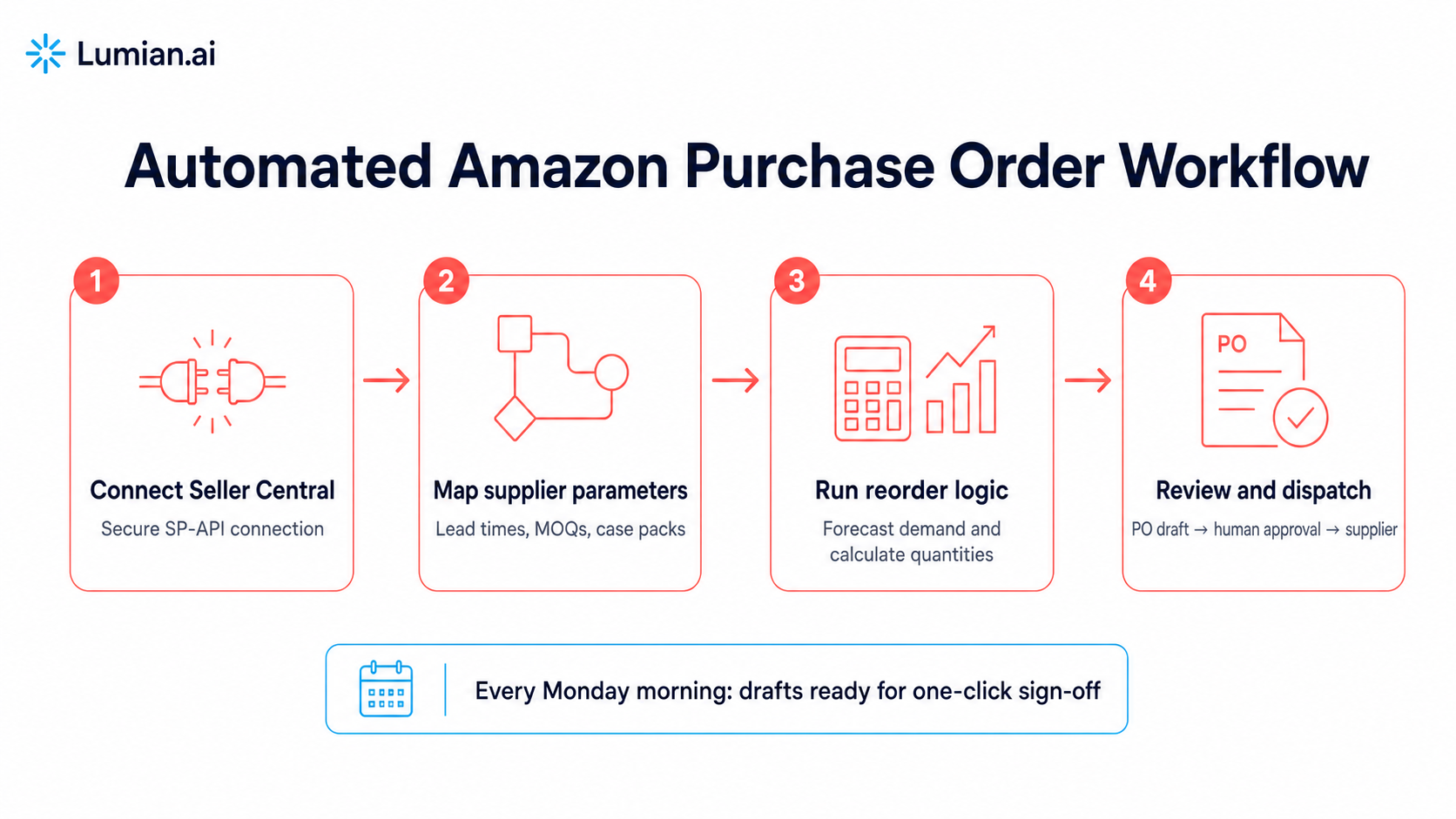
4 Steps to Automate Your Weekly Amazon Purchase Order Workflow
Implementing automated purchase order generation requires structuring your technical connections and operational boundaries.
Step 1: Establish Live API Data Ingestion
Begin by connecting your supply chain platform or AI automation agents to Amazon Seller Central via the Selling Partner API (SP-API). This eliminates manual CSV exports by streaming live order feeds, inventory reserve statuses, and inbound shipment tracking directly into your decision engine.
Step 2: Configure Supplier Parameters and Constraints
Map every SKU in your catalog to its corresponding manufacturer profile inside your automation platform. Define essential operational constraints:
Minimum Order Quantities (MOQs): Minimum production unit thresholds enforced by your factory.
Master Carton Units: Case pack quantities to ensure purchase orders reflect full carton multiples.
Production Lead Times: Supplier manufacturing lead times broken down by order size.
Step 3: Integrate Inventory Velocity with Advertising Controls
Ad campaigns directly impact inventory burn rates. Connecting ad performance with inventory management ensures that when a campaign drives a sales surge, the system recalculates remaining days of cover immediately.
Lumian Agents does this natively: if a SKU approaches a critical threshold before the next PO arrives, it throttles PPC bids automatically to stretch stock and protect organic rank. If a SKU approaches a critical inventory threshold before a new supplier purchase order arrives, the system throttles PPC bids automatically to stretch remaining stock and protect organic keyword ranks.
Step 4: Implement Approval Gates and Automated Dispatch
While small reorders can execute automatically, large weekly capital allocations should utilize an approval gate architecture. The automated system generates a pre-formatted purchase order draft every Monday morning, complete with recommended unit counts and cost breakdowns. A brand manager reviews the draft, approves the capital commitment, and dispatches the PO directly to the supplier via automated EDI or email.
Reviewing the full scope of Lumian Platform Features demonstrates how automated inventory workflows run smoothly alongside dedicated human strategist oversight.
Evaluating Execution Models: Custom Scripts vs. Purpose Built AI
When automating supply chain tasks, brand leaders can choose between custom spreadsheet macros, standalone inventory tools, or hybrid AI native solutions.
Feature / Capability | Custom Macros / Sheets | Standalone Inventory SaaS | Hybrid AI Native Platform |
Data Connection | Manual CSV uploads | Standard API sync | Live 24/7 SP-API streaming |
Ad Velocity Sync | Manual only (paste ad reports weekly) | Limited / Rule based | Real time PPC & burn rate alignment |
PO Draft Generation | Static formula output | Automated PO generation | Automated PO drafts with strategy review |
Risk Containment | High risk of formula error | Rigid rule constraints | Bounded guardrails & approval gates |
Human Governance | Requires manual team labor | Self managed by user | Dedicated Brand Manager oversight |
An integrated solution avoids the maintenance burden of custom builds while adding enterprise-grade guardrails. Discover how hybrid automation scales marketplace brands by reviewing real world results in Lumian Case Studies.
Best Practices for Maintaining Purchase Order Automation
To keep your automated reorder engine operating smoothly as catalog complexity grows, adopt these three operational safeguards:
Conduct Monthly Lead Time Auditing: Regularly update factory production schedules and freight transit averages inside your automation settings to reflect real world carrier delays.
Set Gross Margin Guardrails: Ensure purchase order calculations factor in recent raw material price shifts or freight rate adjustments to protect net product margins.
Review Seasonal Demand Multipliers: Adjust baseline sales velocity multipliers prior to major shopping events like Prime Day or Q4 holiday peaks to ensure safety stock buffers expand accordingly.
To learn how an automated, hybrid management model can streamline your supply chain and accelerate marketplace growth, explore Lumian Amazon Management Services or schedule a strategy consultation.
Frequently Asked Questions
How does automated purchase order software handle supplier Minimum Order Quantities (MOQs)?
Automated purchase order systems allow operators to set SKU level MOQs and case pack rules. When calculated reorder requirements fall below a factory's minimum threshold, the system rounds up to the nearest MOQ or carton multiple.
Can an automated system prevent Amazon stockouts during ad campaign spikes?
Yes. By connecting advertising performance data directly with inventory tracking, an automated system detects advertising surges immediately, recalculating days of cover and triggering purchase order alerts before inventory hits critical levels.
How often should an automated Amazon purchase order run?
While data streams continuously, most brands configure purchase order draft generation on a fixed weekly schedule (such as every Monday morning) to align with factory ordering routines and freight consolidation schedules.
What data do I need to automate purchase orders?
Three inputs per SKU: live sales velocity from Seller Central (via SP-API or reports), supplier constraints (lead time, MOQ, case pack), and your safety stock policy. With those three, a system can calculate reorder points and generate PO drafts; without accurate lead times, no automation stays reliable.
Is it safe to let AI automatically send purchase orders directly to suppliers?
Most enterprise brands utilize approval gates for high value purchase orders. The AI agent generates precise order drafts, which are reviewed and signed off by a human brand manager before final dispatch to the manufacturer.
What happens if a supplier experiences a production delay?
When a supplier updates lead time parameters, the automation engine adjusts safety stock calculations across affected SKUs, raising reorder points and alerting managers to place future POs earlier.
Co-Founder & CEO, Lumian
Robin Lobo is Co-Founder and CEO of Lumian. He built and sold a seven-figure eyeglasses brand on Amazon and spent several years on the client side of traditional agencies before founding Lumian, an AI-native Amazon agency backed by $3M led by Bowery Capital.

AI Agent
Your Amazon business, fully managed.

Brand ManAger

Expert Team
How to Automate a Weekly Amazon Purchase Order
Replace Monday spreadsheet exports with automated supplier POs: stream live Seller Central data via SP-API, calculate dynamic reorder points, and approve drafts in one click.
TL;DR
Automating weekly supplier purchase orders means replacing Monday-morning spreadsheet exports with a system that streams live sales data from Seller Central via SP-API, calculates reorder points from burn rate, lead time, and safety stock, and generates PO drafts for one-click approval. Here's the formula, the 4-step setup, and how to keep it accurate.
Key Takeaways
The Manual Spreadsheet Trap: Relying on static weekly CSV exports causes data lag, order calculation errors, and human bandwidth bottlenecks as SKU counts scale.
Dynamic Reorder Point Logic: Successful PO automation requires algorithms that evaluate real time daily sales velocity, seasonal trends, ad campaign acceleration, and supplier production lead times simultaneously.
SP-API Automation: Connecting automated agents or inventory engines directly to Amazon Seller Central via official API protocols enables real time data streaming and automated order generation.
Inventory-Aware PPC Alignment: Modern purchase order automation bridges supply chain data with pay per click (PPC) advertising, throttling ad spend on low stock items to protect organic keyword ranks.
Human in the Loop Control: High value purchase orders should utilize automated draft generation paired with approval gates, ensuring human strategists validate capital deployment before supplier dispatch.
Note: this guide covers automating replenishment POs you send to your suppliers. If you're looking for Vendor Central purchase orders that Amazon sends to you, that's a different workflow
The Hidden Costs of Manual Weekly Purchase Orders
Managing supply chain replenishment for an expanding Amazon catalog is one of the most time sensitive tasks facing brand operations. As order volume grows, relying on manual weekly purchase order routines creates operational friction.
Every Monday morning, operations teams typically log into Amazon Seller Central, export inventory health reports, download active PPC sales velocity data, and paste numbers into static spreadsheets. From there, brand managers manually calculate safety stock levels, draft purchase orders in PDF formats, and email suppliers.
This manual workflow introduces significant business risks:
Data Lag: By the time a spreadsheet report is cleaned and calculated, the underlying sales velocity numbers are already outdated.
Human Error: Miscalculating supplier lead times or missing an advertising surge on a hero SKU leads to premature stockouts or overstocking.
Capital Tie Up: Overordering inventory to avoid stockouts locks up working capital in excess FBA storage fees and long term holding surcharges.
Across the accounts Lumian manages, agents flag stockout risk an average of 45 days before inventory hits zero. Transitioning from manual spreadsheets to automated purchase orders is an essential operational shift for scaling marketplace brands.
Understanding the Core Reorder Point Formula for Automation
To automate weekly Amazon purchase orders safely, an automated agent or software system must calculate order quantities using dynamic, real time variables rather than static assumptions.
The foundational formula powering automated purchase order engines is:
Reorder Point = (Average Daily Sales × Supplier Lead Time in Days) + Safety Stock
1. Dynamic Average Daily Sales (Burn Rate)
Static models rely on 30 day historical sales averages. Automated systems calculate weighted daily burn rates that adjust for recent 7 day PPC acceleration, upcoming promotional events, and seasonal category trends.
2. Variable Supplier Lead Time
Lead times are rarely fixed. An automated system tracks manufacturing production windows, ocean or air freight transit times, 3PL prep processing, and Amazon FBA receiving delays.
3. Adaptive Safety Stock Buffer
Safety stock acts as an operational buffer against unexpected supply disruptions or demand spikes. Automated systems recalculate safety stock levels dynamically based on supply chain volatility and SKU margin profiles.
4 Steps to Automate Your Weekly Amazon Purchase Order Workflow
Implementing automated purchase order generation requires structuring your technical connections and operational boundaries.
Step 1: Establish Live API Data Ingestion
Begin by connecting your supply chain platform or AI automation agents to Amazon Seller Central via the Selling Partner API (SP-API). This eliminates manual CSV exports by streaming live order feeds, inventory reserve statuses, and inbound shipment tracking directly into your decision engine.
Step 2: Configure Supplier Parameters and Constraints
Map every SKU in your catalog to its corresponding manufacturer profile inside your automation platform. Define essential operational constraints:
Minimum Order Quantities (MOQs): Minimum production unit thresholds enforced by your factory.
Master Carton Units: Case pack quantities to ensure purchase orders reflect full carton multiples.
Production Lead Times: Supplier manufacturing lead times broken down by order size.
Step 3: Integrate Inventory Velocity with Advertising Controls
Ad campaigns directly impact inventory burn rates. Connecting ad performance with inventory management ensures that when a campaign drives a sales surge, the system recalculates remaining days of cover immediately.
Lumian Agents does this natively: if a SKU approaches a critical threshold before the next PO arrives, it throttles PPC bids automatically to stretch stock and protect organic rank. If a SKU approaches a critical inventory threshold before a new supplier purchase order arrives, the system throttles PPC bids automatically to stretch remaining stock and protect organic keyword ranks.
Step 4: Implement Approval Gates and Automated Dispatch
While small reorders can execute automatically, large weekly capital allocations should utilize an approval gate architecture. The automated system generates a pre-formatted purchase order draft every Monday morning, complete with recommended unit counts and cost breakdowns. A brand manager reviews the draft, approves the capital commitment, and dispatches the PO directly to the supplier via automated EDI or email.
Reviewing the full scope of Lumian Platform Features demonstrates how automated inventory workflows run smoothly alongside dedicated human strategist oversight.
Evaluating Execution Models: Custom Scripts vs. Purpose Built AI
When automating supply chain tasks, brand leaders can choose between custom spreadsheet macros, standalone inventory tools, or hybrid AI native solutions.
Feature / Capability | Custom Macros / Sheets | Standalone Inventory SaaS | Hybrid AI Native Platform |
Data Connection | Manual CSV uploads | Standard API sync | Live 24/7 SP-API streaming |
Ad Velocity Sync | Manual only (paste ad reports weekly) | Limited / Rule based | Real time PPC & burn rate alignment |
PO Draft Generation | Static formula output | Automated PO generation | Automated PO drafts with strategy review |
Risk Containment | High risk of formula error | Rigid rule constraints | Bounded guardrails & approval gates |
Human Governance | Requires manual team labor | Self managed by user | Dedicated Brand Manager oversight |
An integrated solution avoids the maintenance burden of custom builds while adding enterprise-grade guardrails. Discover how hybrid automation scales marketplace brands by reviewing real world results in Lumian Case Studies.
Best Practices for Maintaining Purchase Order Automation
To keep your automated reorder engine operating smoothly as catalog complexity grows, adopt these three operational safeguards:
Conduct Monthly Lead Time Auditing: Regularly update factory production schedules and freight transit averages inside your automation settings to reflect real world carrier delays.
Set Gross Margin Guardrails: Ensure purchase order calculations factor in recent raw material price shifts or freight rate adjustments to protect net product margins.
Review Seasonal Demand Multipliers: Adjust baseline sales velocity multipliers prior to major shopping events like Prime Day or Q4 holiday peaks to ensure safety stock buffers expand accordingly.
To learn how an automated, hybrid management model can streamline your supply chain and accelerate marketplace growth, explore Lumian Amazon Management Services or schedule a strategy consultation.
Frequently Asked Questions
How does automated purchase order software handle supplier Minimum Order Quantities (MOQs)?
Automated purchase order systems allow operators to set SKU level MOQs and case pack rules. When calculated reorder requirements fall below a factory's minimum threshold, the system rounds up to the nearest MOQ or carton multiple.
Can an automated system prevent Amazon stockouts during ad campaign spikes?
Yes. By connecting advertising performance data directly with inventory tracking, an automated system detects advertising surges immediately, recalculating days of cover and triggering purchase order alerts before inventory hits critical levels.
How often should an automated Amazon purchase order run?
While data streams continuously, most brands configure purchase order draft generation on a fixed weekly schedule (such as every Monday morning) to align with factory ordering routines and freight consolidation schedules.
What data do I need to automate purchase orders?
Three inputs per SKU: live sales velocity from Seller Central (via SP-API or reports), supplier constraints (lead time, MOQ, case pack), and your safety stock policy. With those three, a system can calculate reorder points and generate PO drafts; without accurate lead times, no automation stays reliable.
Is it safe to let AI automatically send purchase orders directly to suppliers?
Most enterprise brands utilize approval gates for high value purchase orders. The AI agent generates precise order drafts, which are reviewed and signed off by a human brand manager before final dispatch to the manufacturer.
What happens if a supplier experiences a production delay?
When a supplier updates lead time parameters, the automation engine adjusts safety stock calculations across affected SKUs, raising reorder points and alerting managers to place future POs earlier.
Co-Founder & CEO, Lumian
Robin Lobo is Co-Founder and CEO of Lumian. He built and sold a seven-figure eyeglasses brand on Amazon and spent several years on the client side of traditional agencies before founding Lumian, an AI-native Amazon agency backed by $3M led by Bowery Capital.
AI Agent
Your Amazon business, fully managed.
Brand ManAger
Expert Team
How to Automate a Weekly Amazon Purchase Order
Replace Monday spreadsheet exports with automated supplier POs: stream live Seller Central data via SP-API, calculate dynamic reorder points, and approve drafts in one click.
TL;DR
Automating weekly supplier purchase orders means replacing Monday-morning spreadsheet exports with a system that streams live sales data from Seller Central via SP-API, calculates reorder points from burn rate, lead time, and safety stock, and generates PO drafts for one-click approval. Here's the formula, the 4-step setup, and how to keep it accurate.
Key Takeaways
The Manual Spreadsheet Trap: Relying on static weekly CSV exports causes data lag, order calculation errors, and human bandwidth bottlenecks as SKU counts scale.
Dynamic Reorder Point Logic: Successful PO automation requires algorithms that evaluate real time daily sales velocity, seasonal trends, ad campaign acceleration, and supplier production lead times simultaneously.
SP-API Automation: Connecting automated agents or inventory engines directly to Amazon Seller Central via official API protocols enables real time data streaming and automated order generation.
Inventory-Aware PPC Alignment: Modern purchase order automation bridges supply chain data with pay per click (PPC) advertising, throttling ad spend on low stock items to protect organic keyword ranks.
Human in the Loop Control: High value purchase orders should utilize automated draft generation paired with approval gates, ensuring human strategists validate capital deployment before supplier dispatch.
Note: this guide covers automating replenishment POs you send to your suppliers. If you're looking for Vendor Central purchase orders that Amazon sends to you, that's a different workflow
The Hidden Costs of Manual Weekly Purchase Orders
Managing supply chain replenishment for an expanding Amazon catalog is one of the most time sensitive tasks facing brand operations. As order volume grows, relying on manual weekly purchase order routines creates operational friction.
Every Monday morning, operations teams typically log into Amazon Seller Central, export inventory health reports, download active PPC sales velocity data, and paste numbers into static spreadsheets. From there, brand managers manually calculate safety stock levels, draft purchase orders in PDF formats, and email suppliers.
This manual workflow introduces significant business risks:
Data Lag: By the time a spreadsheet report is cleaned and calculated, the underlying sales velocity numbers are already outdated.
Human Error: Miscalculating supplier lead times or missing an advertising surge on a hero SKU leads to premature stockouts or overstocking.
Capital Tie Up: Overordering inventory to avoid stockouts locks up working capital in excess FBA storage fees and long term holding surcharges.
Across the accounts Lumian manages, agents flag stockout risk an average of 45 days before inventory hits zero. Transitioning from manual spreadsheets to automated purchase orders is an essential operational shift for scaling marketplace brands.
Understanding the Core Reorder Point Formula for Automation
To automate weekly Amazon purchase orders safely, an automated agent or software system must calculate order quantities using dynamic, real time variables rather than static assumptions.
The foundational formula powering automated purchase order engines is:
Reorder Point = (Average Daily Sales × Supplier Lead Time in Days) + Safety Stock
1. Dynamic Average Daily Sales (Burn Rate)
Static models rely on 30 day historical sales averages. Automated systems calculate weighted daily burn rates that adjust for recent 7 day PPC acceleration, upcoming promotional events, and seasonal category trends.
2. Variable Supplier Lead Time
Lead times are rarely fixed. An automated system tracks manufacturing production windows, ocean or air freight transit times, 3PL prep processing, and Amazon FBA receiving delays.
3. Adaptive Safety Stock Buffer
Safety stock acts as an operational buffer against unexpected supply disruptions or demand spikes. Automated systems recalculate safety stock levels dynamically based on supply chain volatility and SKU margin profiles.
4 Steps to Automate Your Weekly Amazon Purchase Order Workflow
Implementing automated purchase order generation requires structuring your technical connections and operational boundaries.
Step 1: Establish Live API Data Ingestion
Begin by connecting your supply chain platform or AI automation agents to Amazon Seller Central via the Selling Partner API (SP-API). This eliminates manual CSV exports by streaming live order feeds, inventory reserve statuses, and inbound shipment tracking directly into your decision engine.
Step 2: Configure Supplier Parameters and Constraints
Map every SKU in your catalog to its corresponding manufacturer profile inside your automation platform. Define essential operational constraints:
Minimum Order Quantities (MOQs): Minimum production unit thresholds enforced by your factory.
Master Carton Units: Case pack quantities to ensure purchase orders reflect full carton multiples.
Production Lead Times: Supplier manufacturing lead times broken down by order size.
Step 3: Integrate Inventory Velocity with Advertising Controls
Ad campaigns directly impact inventory burn rates. Connecting ad performance with inventory management ensures that when a campaign drives a sales surge, the system recalculates remaining days of cover immediately.
Lumian Agents does this natively: if a SKU approaches a critical threshold before the next PO arrives, it throttles PPC bids automatically to stretch stock and protect organic rank. If a SKU approaches a critical inventory threshold before a new supplier purchase order arrives, the system throttles PPC bids automatically to stretch remaining stock and protect organic keyword ranks.
Step 4: Implement Approval Gates and Automated Dispatch
While small reorders can execute automatically, large weekly capital allocations should utilize an approval gate architecture. The automated system generates a pre-formatted purchase order draft every Monday morning, complete with recommended unit counts and cost breakdowns. A brand manager reviews the draft, approves the capital commitment, and dispatches the PO directly to the supplier via automated EDI or email.
Reviewing the full scope of Lumian Platform Features demonstrates how automated inventory workflows run smoothly alongside dedicated human strategist oversight.
Evaluating Execution Models: Custom Scripts vs. Purpose Built AI
When automating supply chain tasks, brand leaders can choose between custom spreadsheet macros, standalone inventory tools, or hybrid AI native solutions.
Feature / Capability | Custom Macros / Sheets | Standalone Inventory SaaS | Hybrid AI Native Platform |
Data Connection | Manual CSV uploads | Standard API sync | Live 24/7 SP-API streaming |
Ad Velocity Sync | Manual only (paste ad reports weekly) | Limited / Rule based | Real time PPC & burn rate alignment |
PO Draft Generation | Static formula output | Automated PO generation | Automated PO drafts with strategy review |
Risk Containment | High risk of formula error | Rigid rule constraints | Bounded guardrails & approval gates |
Human Governance | Requires manual team labor | Self managed by user | Dedicated Brand Manager oversight |
An integrated solution avoids the maintenance burden of custom builds while adding enterprise-grade guardrails. Discover how hybrid automation scales marketplace brands by reviewing real world results in Lumian Case Studies.
Best Practices for Maintaining Purchase Order Automation
To keep your automated reorder engine operating smoothly as catalog complexity grows, adopt these three operational safeguards:
Conduct Monthly Lead Time Auditing: Regularly update factory production schedules and freight transit averages inside your automation settings to reflect real world carrier delays.
Set Gross Margin Guardrails: Ensure purchase order calculations factor in recent raw material price shifts or freight rate adjustments to protect net product margins.
Review Seasonal Demand Multipliers: Adjust baseline sales velocity multipliers prior to major shopping events like Prime Day or Q4 holiday peaks to ensure safety stock buffers expand accordingly.
To learn how an automated, hybrid management model can streamline your supply chain and accelerate marketplace growth, explore Lumian Amazon Management Services or schedule a strategy consultation.
Frequently Asked Questions
How does automated purchase order software handle supplier Minimum Order Quantities (MOQs)?
Automated purchase order systems allow operators to set SKU level MOQs and case pack rules. When calculated reorder requirements fall below a factory's minimum threshold, the system rounds up to the nearest MOQ or carton multiple.
Can an automated system prevent Amazon stockouts during ad campaign spikes?
Yes. By connecting advertising performance data directly with inventory tracking, an automated system detects advertising surges immediately, recalculating days of cover and triggering purchase order alerts before inventory hits critical levels.
How often should an automated Amazon purchase order run?
While data streams continuously, most brands configure purchase order draft generation on a fixed weekly schedule (such as every Monday morning) to align with factory ordering routines and freight consolidation schedules.
What data do I need to automate purchase orders?
Three inputs per SKU: live sales velocity from Seller Central (via SP-API or reports), supplier constraints (lead time, MOQ, case pack), and your safety stock policy. With those three, a system can calculate reorder points and generate PO drafts; without accurate lead times, no automation stays reliable.
Is it safe to let AI automatically send purchase orders directly to suppliers?
Most enterprise brands utilize approval gates for high value purchase orders. The AI agent generates precise order drafts, which are reviewed and signed off by a human brand manager before final dispatch to the manufacturer.
What happens if a supplier experiences a production delay?
When a supplier updates lead time parameters, the automation engine adjusts safety stock calculations across affected SKUs, raising reorder points and alerting managers to place future POs earlier.
Co-Founder & CEO, Lumian
Robin Lobo is Co-Founder and CEO of Lumian. He built and sold a seven-figure eyeglasses brand on Amazon and spent several years on the client side of traditional agencies before founding Lumian, an AI-native Amazon agency backed by $3M led by Bowery Capital.

AI Agent
Your Amazon business, fully managed.
Brand ManAger
Expert Team