How to Get Alerted the Moment You Lose the Amazon Buy Box
Seller Central reports lag 24-48 hours after Buy Box loss. Real-time alerts use SP-API ANY_OFFER_CHANGED webhooks to notify you in seconds. Here's how to set them up 3 ways.

TL;DR
Seller Central Business Reports lag 24 to 48 hours, so by the time you see a Buy Box drop, you've been losing sales for two days. Real-time alerts require subscribing to Amazon's ANY_OFFER_CHANGED notification via SP-API, either through a monitoring tool, an AI agent, or a custom webhook. Here's how each works and how to set one up.
Key Takeaways
Immediate Financial Impact: Because the Featured Offer accounts for the overwhelming majority of marketplace transactions, unmonitored Buy Box loss directly drains daily revenue and ad capital.
The Native Reporting Delay: Relying on manual Business Report checks introduces a 24 to 48 hour data lag, leaving listings exposed to unauthorized resellers, price suppressions, and listing hijacking.
SP-API Webhook Mechanics: Real-time alerting relies on push-based notifications via Amazon SP-API, processing price and offer state changes in seconds rather than hours.
Root Cause Categorization: Buy Box loss stems from four main triggers: unauthorized seller undercutting, off-Amazon competitive price suppression, listing suppression, or seller performance metric shifts.
Automated Execution: The most effective notification systems do not just send emails - they trigger instant ad throttling, price floor validation, and automated case management.
The High Cost of Unmonitored Buy Box Loss
On Amazon, winning the Featured Offer (historically known as the Buy Box) is the single most important factor determining sales velocity. When a customer clicks "Add to Cart" or "Buy Now," the order is routed exclusively to the seller occupying the Featured Offer position.
Roughly 82% of Amazon sales go through the Featured Offer, and the share is higher on mobile according to ChannelEngine. For purchases made on mobile devices, that share is even higher.
When your listing loses the Buy Box, purchase conversion stops almost immediately. If pay-per-click (PPC) ad campaigns remain active while an unauthorized reseller holds the Featured Offer, your ad budget continues driving traffic to a page where a competitor captures the sale. Preventing this revenue leakage requires moving beyond manual daily checks and implementing instant notification architecture.
Why Native Seller Central Reports Fall Short
Many brand managers rely on Seller Central Business Reports to monitor their Featured Offer percentage. Navigating to Reports, selecting Business Reports, and checking Detail Page Sales and Traffic by Child Item reveals your historical Buy Box Percentage.
While this report is useful for long-term trend analysis, it is structurally incapable of serving as an early warning system due to three core limitations:
A 24 to 48 Hour Reporting Lag: Amazon processes Business Report data inbatches. By the time a drop in Buy Box win percentage appears in your dashboard, your listing may have been losing sales for two full days.
Aggregated Averages Masking Short-Term Loss: Business Reports calculate win percentages over multi-day spans. A listing that held a 100% win rate for 20 hours but lost it during peak evening traffic hours may still show an acceptable daily average, hiding significant revenue loss.
Passive Data Visualization: A spreadsheet report requires a human operator to log in, identify the anomaly, diagnose the root cause, and manually execute a fix inside Seller Central.
How Real-Time Buy Box Alerts Work Behind the Scenes
Achieving instant notification requires a push-based data architecture rather than a pull-based manual report download. Modern e-commerce monitoring systems connect directly to Amazon Seller Central via the official Selling Partner API (SP-API).
How to Set Up Real-Time Buy Box Alerts (3 Ways)
1. Use a monitoring tool: Connect via SP-API OAuth in minutes, get email/Slack alerts, but you still execute fixes manually.
2. Build a custom webhook: Register an SP-API app, subscribe to ANY_OFFER_CHANGED, route through SQS to your alerting stack; requires engineering and ongoing maintenance.
3. Deploy an integrated AI agent: Same detection, plus automated ad throttling and repricing within guardrails (link to Lumian Agents).
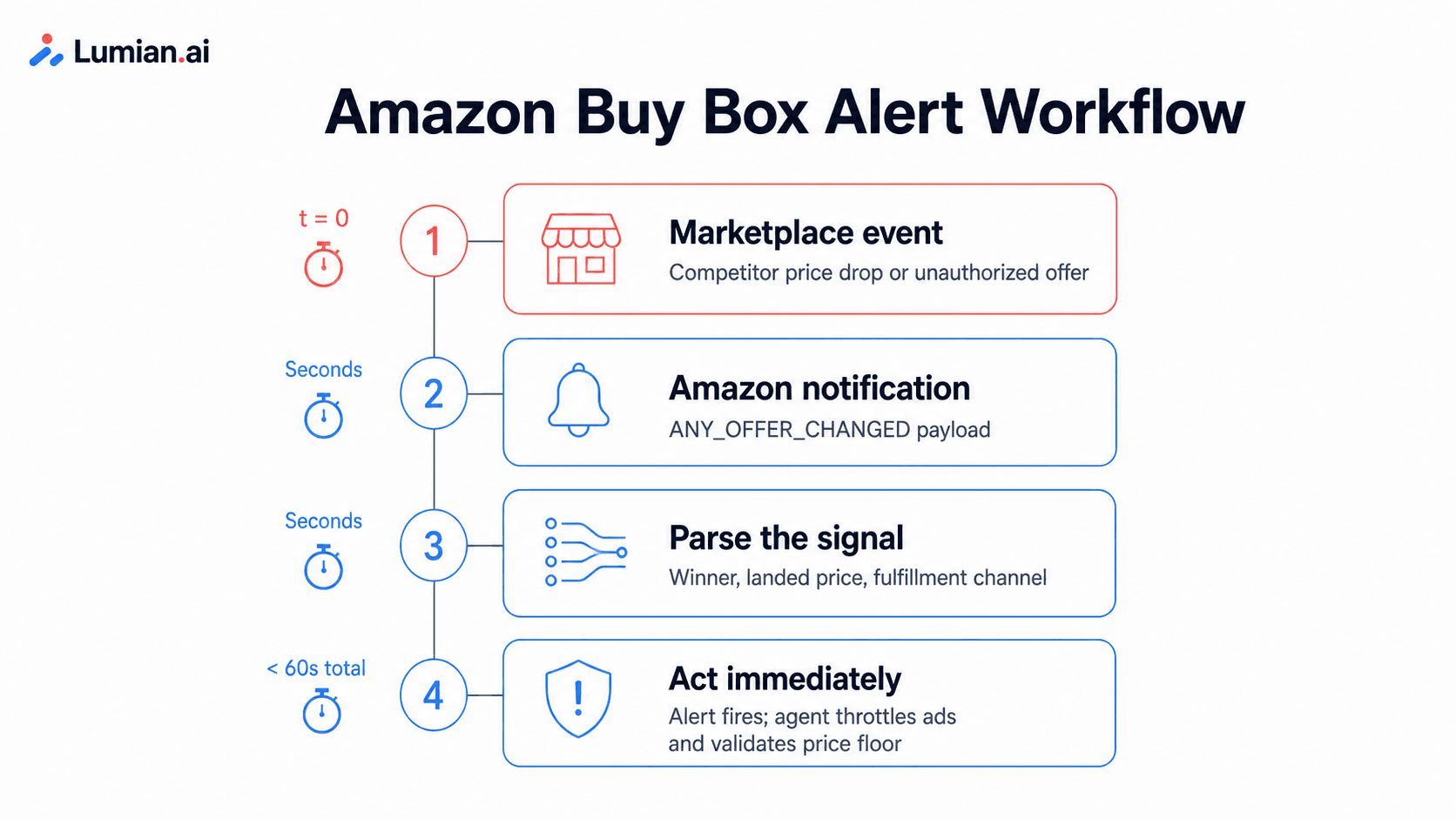
The Mechanism: ANY_OFFER_CHANGED Webhooks
Amazon provides a dedicated Notifications API that allows authorized applications to subscribe to live marketplace events. The primary payload for monitoring the Featured Offer is the ANY_OFFER_CHANGED notification.
Whenever any of the top 20 offers for an ASIN changes - whether due to a price adjustment, stock status update, or fulfillment method shift - Amazon dispatches an event payload through Amazon Simple Queue Service (SQS) or Simple Notification Service (SNS).
An automated processing engine parses this payload in real time to evaluate three key data points:
Featured Offer Winner: Identifies whether your seller ID holds the Buy Box position.
Winning Landed Price: Analyzes the item price plus shipping cost of the current Buy Box holder.
Seller Fulfillment Channel: Identifies whether the winning offer is Fulfilled by Amazon (FBA) or Fulfilled by Merchant (FBM).
When the system detects that your seller ID is no longer listed as the Featured Offer winner, an automated alert fires within seconds of the event.
Comparing Buy Box Monitoring Methods
Choosing the right alerting infrastructure depends on your catalog size, internal team resources, and technical requirements.
Monitoring Method | Detection Speed | Root Cause Context | Actionability | Internal Effort |
Seller Central Reports | 24 - 48 Hours | Low (Aggregated historical data) | Passive (Manual review required) | High manual labor |
Basic Email Alerts | 15 - 60 Minutes | Moderate (Identifies winning seller) | Manual intervention required | Moderate daily overhead |
Integrated AI Agents | Real-Time (< 60s) | High (Cross-references PPC & Stock) | Automated (Triggers repricing & ad pauses) | Minimal (review approval queues) |
Diagnosing the 4 Root Causes of Sudden Buy Box Loss
Receiving an instant alert is only the first step. To recover the Featured Offer, your team or management system must quickly diagnose why the loss occurred.
<table>
<caption>The 4 Root Causes of Sudden Buy Box Loss</caption>
<thead>
<tr>
<th scope="col">Root Cause</th>
<th scope="col">What Happens</th>
<th scope="col">First Response</th>
</tr>
</thead>
<tbody>
<tr>
<th scope="row">Unauthorized reseller</th>
<td>A third-party seller undercuts your price on your branded ASIN and takes the Featured Offer</td>
<td>Verify the seller, reprice within margin floors, begin enforcement</td>
</tr>
<tr>
<th scope="row">Off-Amazon price suppression</th>
<td>Amazon detects a lower price on another retail site and removes the Add to Cart button entirely</td>
<td>Audit pricing feeds across channels, restore MAP compliance</td>
</tr>
<tr>
<th scope="row">Account health drop</th>
<td>ODR above 1%, late shipments, or slow responses revoke Buy Box eligibility</td>
<td>Check Account Health dashboard, resolve the breaching metric</td>
</tr>
<tr>
<th scope="row">Stockout or FBA receiving delay</th>
<td>Depleted or delayed inventory drops your offer ranking</td>
<td>Throttle ads immediately, expedite replenishment</td>
</tr>
</tbody>
</table>
1. Unauthorized Sellers and Hijackers
An unauthorized reseller or distributor lists inventory on your branded ASIN, undercutting your price by a small margin. Because Amazon's algorithm weighs landed price heavily alongside fulfillment speed, the competitor temporarily steals the Featured Offer.
2. Competitive Price Suppression (Buy Box Disappearance)
If Amazon's automated web crawlers detect that your product is listed at a lower landed price on another retail website (such as Walmart, Target, or a direct-to-consumer store), Amazon suppresses the Buy Box entirely. The "Add to Cart" button disappears, replaced by a generic "See All Buying Options" button.
3. Account Health and Performance Metric Drops
Amazon evaluates seller trust metrics continuously. If your Order Defect Rate (ODR) breaches the 1% threshold, late shipment rates rise, or customer response times lag, Amazon may revoke Buy Box eligibility across affected listings, transferring preference to competing sellers.
4. Inventory Stockouts and FBA Receiving Delays
If your FBA inventory depletes or incoming inventory transfers experience receiving delays, Amazon drops your offer ranking to protect customer delivery expectations.
From Alerts to Action: Automating Buy Box Recovery
The primary goal of real-time monitoring is minimizing time-to-resolution. A notification that sits unread in an inbox for hours offers little advantage over a daily report.
Modern e-commerce brands pair real-time detection with automated execution layers. With an integrated platform like Lumian Agents, the same webhook that fires the alert also triggers operational safeguards:
Automated PPC Ad Throttling: The moment a Buy Box loss event is verified, the system pauses or reduces ad campaign spend on the affected ASIN, preventing ad spend waste on non-converting traffic.
Dynamic Price Alignment: If an unauthorized seller undercuts your offer within pre-approved margin boundaries, automated repricing rules adjust your offer to regain the Featured Offer position instantly.
Integrated Catalog Auditing: If the Buy Box disappears due to price suppression, automated tools check competitive pricing feeds and flag necessary MAP compliance adjustments.
To learn how integrated monitoring and automated workflows protect brand margins, explore the complete suite of Lumian Platform Features or review real-world brand results in Lumian Case Studies.
Frequently Asked Questions
How fast can an API-based alert notify me of a lost Buy Box?
Webhook-based alerts powered by Amazon's Selling Partner API (SP-API) process offer changes in real time, sending notifications within seconds of the offer change.
What is the difference between a lost Buy Box and a suppressed Buy Box?
A lost Buy Box means a competing seller currently holds the "Add to Cart" button on your listing. A suppressed Buy Box means Amazon has removed the "Add to Cart" button entirely for all sellers, usually due to competitive pricing policies or listing policy flags.
Why does my Buy Box percentage drop even if I am the only seller on my listing?
Buy Box percentage can drop on single-seller listings if Amazon suppresses the Featured Offer due to off-Amazon price undercutting, listing policy non-compliance, or a temporary FBA inventory stockout.
Can an AI agent automatically fix a lost Buy Box?
Yes. Purpose-built AI agents can execute automated repricing within safe parameter bounds, throttle active PPC ad campaigns to prevent wasted spend, and open support tickets for catalog suppressions without requiring manual intervention.
Will setting up real-time Buy Box alerts require sharing my Seller Central password?
No. Secure monitoring platforms connect using official Amazon SP-API OAuth 2.0 authorization, granting read-only or scoped operational access without ever exposing primary account credentials.
Does Amazon notify me when I lose the Buy Box?
No. Amazon has no native alert for Buy Box loss. Business Reports show your win percentage with a 24 to 48 hour delay, and no email or dashboard notification fires when a competitor takes the Featured Offer. Real-time alerting requires a third-party tool or SP-API integration.
Co-Founder & CEO, Lumian
Robin Lobo is Co-Founder and CEO of Lumian. He built and sold a seven-figure eyeglasses brand on Amazon and spent several years on the client side of traditional agencies before founding Lumian, an AI-native Amazon agency backed by $3M led by Bowery Capital.

AI Agent
Your Amazon business, fully managed.

Brand ManAger

Expert Team
How to Get Alerted the Moment You Lose the Amazon Buy Box
Seller Central reports lag 24-48 hours after Buy Box loss. Real-time alerts use SP-API ANY_OFFER_CHANGED webhooks to notify you in seconds. Here's how to set them up 3 ways.
TL;DR
Seller Central Business Reports lag 24 to 48 hours, so by the time you see a Buy Box drop, you've been losing sales for two days. Real-time alerts require subscribing to Amazon's ANY_OFFER_CHANGED notification via SP-API, either through a monitoring tool, an AI agent, or a custom webhook. Here's how each works and how to set one up.
Key Takeaways
Immediate Financial Impact: Because the Featured Offer accounts for the overwhelming majority of marketplace transactions, unmonitored Buy Box loss directly drains daily revenue and ad capital.
The Native Reporting Delay: Relying on manual Business Report checks introduces a 24 to 48 hour data lag, leaving listings exposed to unauthorized resellers, price suppressions, and listing hijacking.
SP-API Webhook Mechanics: Real-time alerting relies on push-based notifications via Amazon SP-API, processing price and offer state changes in seconds rather than hours.
Root Cause Categorization: Buy Box loss stems from four main triggers: unauthorized seller undercutting, off-Amazon competitive price suppression, listing suppression, or seller performance metric shifts.
Automated Execution: The most effective notification systems do not just send emails - they trigger instant ad throttling, price floor validation, and automated case management.
The High Cost of Unmonitored Buy Box Loss
On Amazon, winning the Featured Offer (historically known as the Buy Box) is the single most important factor determining sales velocity. When a customer clicks "Add to Cart" or "Buy Now," the order is routed exclusively to the seller occupying the Featured Offer position.
Roughly 82% of Amazon sales go through the Featured Offer, and the share is higher on mobile according to ChannelEngine. For purchases made on mobile devices, that share is even higher.
When your listing loses the Buy Box, purchase conversion stops almost immediately. If pay-per-click (PPC) ad campaigns remain active while an unauthorized reseller holds the Featured Offer, your ad budget continues driving traffic to a page where a competitor captures the sale. Preventing this revenue leakage requires moving beyond manual daily checks and implementing instant notification architecture.
Why Native Seller Central Reports Fall Short
Many brand managers rely on Seller Central Business Reports to monitor their Featured Offer percentage. Navigating to Reports, selecting Business Reports, and checking Detail Page Sales and Traffic by Child Item reveals your historical Buy Box Percentage.
While this report is useful for long-term trend analysis, it is structurally incapable of serving as an early warning system due to three core limitations:
A 24 to 48 Hour Reporting Lag: Amazon processes Business Report data inbatches. By the time a drop in Buy Box win percentage appears in your dashboard, your listing may have been losing sales for two full days.
Aggregated Averages Masking Short-Term Loss: Business Reports calculate win percentages over multi-day spans. A listing that held a 100% win rate for 20 hours but lost it during peak evening traffic hours may still show an acceptable daily average, hiding significant revenue loss.
Passive Data Visualization: A spreadsheet report requires a human operator to log in, identify the anomaly, diagnose the root cause, and manually execute a fix inside Seller Central.
How Real-Time Buy Box Alerts Work Behind the Scenes
Achieving instant notification requires a push-based data architecture rather than a pull-based manual report download. Modern e-commerce monitoring systems connect directly to Amazon Seller Central via the official Selling Partner API (SP-API).
How to Set Up Real-Time Buy Box Alerts (3 Ways)
1. Use a monitoring tool: Connect via SP-API OAuth in minutes, get email/Slack alerts, but you still execute fixes manually.
2. Build a custom webhook: Register an SP-API app, subscribe to ANY_OFFER_CHANGED, route through SQS to your alerting stack; requires engineering and ongoing maintenance.
3. Deploy an integrated AI agent: Same detection, plus automated ad throttling and repricing within guardrails (link to Lumian Agents).
The Mechanism: ANY_OFFER_CHANGED Webhooks
Amazon provides a dedicated Notifications API that allows authorized applications to subscribe to live marketplace events. The primary payload for monitoring the Featured Offer is the ANY_OFFER_CHANGED notification.
Whenever any of the top 20 offers for an ASIN changes - whether due to a price adjustment, stock status update, or fulfillment method shift - Amazon dispatches an event payload through Amazon Simple Queue Service (SQS) or Simple Notification Service (SNS).
An automated processing engine parses this payload in real time to evaluate three key data points:
Featured Offer Winner: Identifies whether your seller ID holds the Buy Box position.
Winning Landed Price: Analyzes the item price plus shipping cost of the current Buy Box holder.
Seller Fulfillment Channel: Identifies whether the winning offer is Fulfilled by Amazon (FBA) or Fulfilled by Merchant (FBM).
When the system detects that your seller ID is no longer listed as the Featured Offer winner, an automated alert fires within seconds of the event.
Comparing Buy Box Monitoring Methods
Choosing the right alerting infrastructure depends on your catalog size, internal team resources, and technical requirements.
Monitoring Method | Detection Speed | Root Cause Context | Actionability | Internal Effort |
Seller Central Reports | 24 - 48 Hours | Low (Aggregated historical data) | Passive (Manual review required) | High manual labor |
Basic Email Alerts | 15 - 60 Minutes | Moderate (Identifies winning seller) | Manual intervention required | Moderate daily overhead |
Integrated AI Agents | Real-Time (< 60s) | High (Cross-references PPC & Stock) | Automated (Triggers repricing & ad pauses) | Minimal (review approval queues) |
Diagnosing the 4 Root Causes of Sudden Buy Box Loss
Receiving an instant alert is only the first step. To recover the Featured Offer, your team or management system must quickly diagnose why the loss occurred.
<table>
<caption>The 4 Root Causes of Sudden Buy Box Loss</caption>
<thead>
<tr>
<th scope="col">Root Cause</th>
<th scope="col">What Happens</th>
<th scope="col">First Response</th>
</tr>
</thead>
<tbody>
<tr>
<th scope="row">Unauthorized reseller</th>
<td>A third-party seller undercuts your price on your branded ASIN and takes the Featured Offer</td>
<td>Verify the seller, reprice within margin floors, begin enforcement</td>
</tr>
<tr>
<th scope="row">Off-Amazon price suppression</th>
<td>Amazon detects a lower price on another retail site and removes the Add to Cart button entirely</td>
<td>Audit pricing feeds across channels, restore MAP compliance</td>
</tr>
<tr>
<th scope="row">Account health drop</th>
<td>ODR above 1%, late shipments, or slow responses revoke Buy Box eligibility</td>
<td>Check Account Health dashboard, resolve the breaching metric</td>
</tr>
<tr>
<th scope="row">Stockout or FBA receiving delay</th>
<td>Depleted or delayed inventory drops your offer ranking</td>
<td>Throttle ads immediately, expedite replenishment</td>
</tr>
</tbody>
</table>
1. Unauthorized Sellers and Hijackers
An unauthorized reseller or distributor lists inventory on your branded ASIN, undercutting your price by a small margin. Because Amazon's algorithm weighs landed price heavily alongside fulfillment speed, the competitor temporarily steals the Featured Offer.
2. Competitive Price Suppression (Buy Box Disappearance)
If Amazon's automated web crawlers detect that your product is listed at a lower landed price on another retail website (such as Walmart, Target, or a direct-to-consumer store), Amazon suppresses the Buy Box entirely. The "Add to Cart" button disappears, replaced by a generic "See All Buying Options" button.
3. Account Health and Performance Metric Drops
Amazon evaluates seller trust metrics continuously. If your Order Defect Rate (ODR) breaches the 1% threshold, late shipment rates rise, or customer response times lag, Amazon may revoke Buy Box eligibility across affected listings, transferring preference to competing sellers.
4. Inventory Stockouts and FBA Receiving Delays
If your FBA inventory depletes or incoming inventory transfers experience receiving delays, Amazon drops your offer ranking to protect customer delivery expectations.
From Alerts to Action: Automating Buy Box Recovery
The primary goal of real-time monitoring is minimizing time-to-resolution. A notification that sits unread in an inbox for hours offers little advantage over a daily report.
Modern e-commerce brands pair real-time detection with automated execution layers. With an integrated platform like Lumian Agents, the same webhook that fires the alert also triggers operational safeguards:
Automated PPC Ad Throttling: The moment a Buy Box loss event is verified, the system pauses or reduces ad campaign spend on the affected ASIN, preventing ad spend waste on non-converting traffic.
Dynamic Price Alignment: If an unauthorized seller undercuts your offer within pre-approved margin boundaries, automated repricing rules adjust your offer to regain the Featured Offer position instantly.
Integrated Catalog Auditing: If the Buy Box disappears due to price suppression, automated tools check competitive pricing feeds and flag necessary MAP compliance adjustments.
To learn how integrated monitoring and automated workflows protect brand margins, explore the complete suite of Lumian Platform Features or review real-world brand results in Lumian Case Studies.
Frequently Asked Questions
How fast can an API-based alert notify me of a lost Buy Box?
Webhook-based alerts powered by Amazon's Selling Partner API (SP-API) process offer changes in real time, sending notifications within seconds of the offer change.
What is the difference between a lost Buy Box and a suppressed Buy Box?
A lost Buy Box means a competing seller currently holds the "Add to Cart" button on your listing. A suppressed Buy Box means Amazon has removed the "Add to Cart" button entirely for all sellers, usually due to competitive pricing policies or listing policy flags.
Why does my Buy Box percentage drop even if I am the only seller on my listing?
Buy Box percentage can drop on single-seller listings if Amazon suppresses the Featured Offer due to off-Amazon price undercutting, listing policy non-compliance, or a temporary FBA inventory stockout.
Can an AI agent automatically fix a lost Buy Box?
Yes. Purpose-built AI agents can execute automated repricing within safe parameter bounds, throttle active PPC ad campaigns to prevent wasted spend, and open support tickets for catalog suppressions without requiring manual intervention.
Will setting up real-time Buy Box alerts require sharing my Seller Central password?
No. Secure monitoring platforms connect using official Amazon SP-API OAuth 2.0 authorization, granting read-only or scoped operational access without ever exposing primary account credentials.
Does Amazon notify me when I lose the Buy Box?
No. Amazon has no native alert for Buy Box loss. Business Reports show your win percentage with a 24 to 48 hour delay, and no email or dashboard notification fires when a competitor takes the Featured Offer. Real-time alerting requires a third-party tool or SP-API integration.
Co-Founder & CEO, Lumian
Robin Lobo is Co-Founder and CEO of Lumian. He built and sold a seven-figure eyeglasses brand on Amazon and spent several years on the client side of traditional agencies before founding Lumian, an AI-native Amazon agency backed by $3M led by Bowery Capital.
AI Agent
Your Amazon business, fully managed.
Brand ManAger
Expert Team
How to Get Alerted the Moment You Lose the Amazon Buy Box
Seller Central reports lag 24-48 hours after Buy Box loss. Real-time alerts use SP-API ANY_OFFER_CHANGED webhooks to notify you in seconds. Here's how to set them up 3 ways.
TL;DR
Seller Central Business Reports lag 24 to 48 hours, so by the time you see a Buy Box drop, you've been losing sales for two days. Real-time alerts require subscribing to Amazon's ANY_OFFER_CHANGED notification via SP-API, either through a monitoring tool, an AI agent, or a custom webhook. Here's how each works and how to set one up.
Key Takeaways
Immediate Financial Impact: Because the Featured Offer accounts for the overwhelming majority of marketplace transactions, unmonitored Buy Box loss directly drains daily revenue and ad capital.
The Native Reporting Delay: Relying on manual Business Report checks introduces a 24 to 48 hour data lag, leaving listings exposed to unauthorized resellers, price suppressions, and listing hijacking.
SP-API Webhook Mechanics: Real-time alerting relies on push-based notifications via Amazon SP-API, processing price and offer state changes in seconds rather than hours.
Root Cause Categorization: Buy Box loss stems from four main triggers: unauthorized seller undercutting, off-Amazon competitive price suppression, listing suppression, or seller performance metric shifts.
Automated Execution: The most effective notification systems do not just send emails - they trigger instant ad throttling, price floor validation, and automated case management.
The High Cost of Unmonitored Buy Box Loss
On Amazon, winning the Featured Offer (historically known as the Buy Box) is the single most important factor determining sales velocity. When a customer clicks "Add to Cart" or "Buy Now," the order is routed exclusively to the seller occupying the Featured Offer position.
Roughly 82% of Amazon sales go through the Featured Offer, and the share is higher on mobile according to ChannelEngine. For purchases made on mobile devices, that share is even higher.
When your listing loses the Buy Box, purchase conversion stops almost immediately. If pay-per-click (PPC) ad campaigns remain active while an unauthorized reseller holds the Featured Offer, your ad budget continues driving traffic to a page where a competitor captures the sale. Preventing this revenue leakage requires moving beyond manual daily checks and implementing instant notification architecture.
Why Native Seller Central Reports Fall Short
Many brand managers rely on Seller Central Business Reports to monitor their Featured Offer percentage. Navigating to Reports, selecting Business Reports, and checking Detail Page Sales and Traffic by Child Item reveals your historical Buy Box Percentage.
While this report is useful for long-term trend analysis, it is structurally incapable of serving as an early warning system due to three core limitations:
A 24 to 48 Hour Reporting Lag: Amazon processes Business Report data inbatches. By the time a drop in Buy Box win percentage appears in your dashboard, your listing may have been losing sales for two full days.
Aggregated Averages Masking Short-Term Loss: Business Reports calculate win percentages over multi-day spans. A listing that held a 100% win rate for 20 hours but lost it during peak evening traffic hours may still show an acceptable daily average, hiding significant revenue loss.
Passive Data Visualization: A spreadsheet report requires a human operator to log in, identify the anomaly, diagnose the root cause, and manually execute a fix inside Seller Central.
How Real-Time Buy Box Alerts Work Behind the Scenes
Achieving instant notification requires a push-based data architecture rather than a pull-based manual report download. Modern e-commerce monitoring systems connect directly to Amazon Seller Central via the official Selling Partner API (SP-API).
How to Set Up Real-Time Buy Box Alerts (3 Ways)
1. Use a monitoring tool: Connect via SP-API OAuth in minutes, get email/Slack alerts, but you still execute fixes manually.
2. Build a custom webhook: Register an SP-API app, subscribe to ANY_OFFER_CHANGED, route through SQS to your alerting stack; requires engineering and ongoing maintenance.
3. Deploy an integrated AI agent: Same detection, plus automated ad throttling and repricing within guardrails (link to Lumian Agents).
The Mechanism: ANY_OFFER_CHANGED Webhooks
Amazon provides a dedicated Notifications API that allows authorized applications to subscribe to live marketplace events. The primary payload for monitoring the Featured Offer is the ANY_OFFER_CHANGED notification.
Whenever any of the top 20 offers for an ASIN changes - whether due to a price adjustment, stock status update, or fulfillment method shift - Amazon dispatches an event payload through Amazon Simple Queue Service (SQS) or Simple Notification Service (SNS).
An automated processing engine parses this payload in real time to evaluate three key data points:
Featured Offer Winner: Identifies whether your seller ID holds the Buy Box position.
Winning Landed Price: Analyzes the item price plus shipping cost of the current Buy Box holder.
Seller Fulfillment Channel: Identifies whether the winning offer is Fulfilled by Amazon (FBA) or Fulfilled by Merchant (FBM).
When the system detects that your seller ID is no longer listed as the Featured Offer winner, an automated alert fires within seconds of the event.
Comparing Buy Box Monitoring Methods
Choosing the right alerting infrastructure depends on your catalog size, internal team resources, and technical requirements.
Monitoring Method | Detection Speed | Root Cause Context | Actionability | Internal Effort |
Seller Central Reports | 24 - 48 Hours | Low (Aggregated historical data) | Passive (Manual review required) | High manual labor |
Basic Email Alerts | 15 - 60 Minutes | Moderate (Identifies winning seller) | Manual intervention required | Moderate daily overhead |
Integrated AI Agents | Real-Time (< 60s) | High (Cross-references PPC & Stock) | Automated (Triggers repricing & ad pauses) | Minimal (review approval queues) |
Diagnosing the 4 Root Causes of Sudden Buy Box Loss
Receiving an instant alert is only the first step. To recover the Featured Offer, your team or management system must quickly diagnose why the loss occurred.
<table>
<caption>The 4 Root Causes of Sudden Buy Box Loss</caption>
<thead>
<tr>
<th scope="col">Root Cause</th>
<th scope="col">What Happens</th>
<th scope="col">First Response</th>
</tr>
</thead>
<tbody>
<tr>
<th scope="row">Unauthorized reseller</th>
<td>A third-party seller undercuts your price on your branded ASIN and takes the Featured Offer</td>
<td>Verify the seller, reprice within margin floors, begin enforcement</td>
</tr>
<tr>
<th scope="row">Off-Amazon price suppression</th>
<td>Amazon detects a lower price on another retail site and removes the Add to Cart button entirely</td>
<td>Audit pricing feeds across channels, restore MAP compliance</td>
</tr>
<tr>
<th scope="row">Account health drop</th>
<td>ODR above 1%, late shipments, or slow responses revoke Buy Box eligibility</td>
<td>Check Account Health dashboard, resolve the breaching metric</td>
</tr>
<tr>
<th scope="row">Stockout or FBA receiving delay</th>
<td>Depleted or delayed inventory drops your offer ranking</td>
<td>Throttle ads immediately, expedite replenishment</td>
</tr>
</tbody>
</table>
1. Unauthorized Sellers and Hijackers
An unauthorized reseller or distributor lists inventory on your branded ASIN, undercutting your price by a small margin. Because Amazon's algorithm weighs landed price heavily alongside fulfillment speed, the competitor temporarily steals the Featured Offer.
2. Competitive Price Suppression (Buy Box Disappearance)
If Amazon's automated web crawlers detect that your product is listed at a lower landed price on another retail website (such as Walmart, Target, or a direct-to-consumer store), Amazon suppresses the Buy Box entirely. The "Add to Cart" button disappears, replaced by a generic "See All Buying Options" button.
3. Account Health and Performance Metric Drops
Amazon evaluates seller trust metrics continuously. If your Order Defect Rate (ODR) breaches the 1% threshold, late shipment rates rise, or customer response times lag, Amazon may revoke Buy Box eligibility across affected listings, transferring preference to competing sellers.
4. Inventory Stockouts and FBA Receiving Delays
If your FBA inventory depletes or incoming inventory transfers experience receiving delays, Amazon drops your offer ranking to protect customer delivery expectations.
From Alerts to Action: Automating Buy Box Recovery
The primary goal of real-time monitoring is minimizing time-to-resolution. A notification that sits unread in an inbox for hours offers little advantage over a daily report.
Modern e-commerce brands pair real-time detection with automated execution layers. With an integrated platform like Lumian Agents, the same webhook that fires the alert also triggers operational safeguards:
Automated PPC Ad Throttling: The moment a Buy Box loss event is verified, the system pauses or reduces ad campaign spend on the affected ASIN, preventing ad spend waste on non-converting traffic.
Dynamic Price Alignment: If an unauthorized seller undercuts your offer within pre-approved margin boundaries, automated repricing rules adjust your offer to regain the Featured Offer position instantly.
Integrated Catalog Auditing: If the Buy Box disappears due to price suppression, automated tools check competitive pricing feeds and flag necessary MAP compliance adjustments.
To learn how integrated monitoring and automated workflows protect brand margins, explore the complete suite of Lumian Platform Features or review real-world brand results in Lumian Case Studies.
Frequently Asked Questions
How fast can an API-based alert notify me of a lost Buy Box?
Webhook-based alerts powered by Amazon's Selling Partner API (SP-API) process offer changes in real time, sending notifications within seconds of the offer change.
What is the difference between a lost Buy Box and a suppressed Buy Box?
A lost Buy Box means a competing seller currently holds the "Add to Cart" button on your listing. A suppressed Buy Box means Amazon has removed the "Add to Cart" button entirely for all sellers, usually due to competitive pricing policies or listing policy flags.
Why does my Buy Box percentage drop even if I am the only seller on my listing?
Buy Box percentage can drop on single-seller listings if Amazon suppresses the Featured Offer due to off-Amazon price undercutting, listing policy non-compliance, or a temporary FBA inventory stockout.
Can an AI agent automatically fix a lost Buy Box?
Yes. Purpose-built AI agents can execute automated repricing within safe parameter bounds, throttle active PPC ad campaigns to prevent wasted spend, and open support tickets for catalog suppressions without requiring manual intervention.
Will setting up real-time Buy Box alerts require sharing my Seller Central password?
No. Secure monitoring platforms connect using official Amazon SP-API OAuth 2.0 authorization, granting read-only or scoped operational access without ever exposing primary account credentials.
Does Amazon notify me when I lose the Buy Box?
No. Amazon has no native alert for Buy Box loss. Business Reports show your win percentage with a 24 to 48 hour delay, and no email or dashboard notification fires when a competitor takes the Featured Offer. Real-time alerting requires a third-party tool or SP-API integration.
Co-Founder & CEO, Lumian
Robin Lobo is Co-Founder and CEO of Lumian. He built and sold a seven-figure eyeglasses brand on Amazon and spent several years on the client side of traditional agencies before founding Lumian, an AI-native Amazon agency backed by $3M led by Bowery Capital.

AI Agent
Your Amazon business, fully managed.
Brand ManAger
Expert Team